
Q1.At a company, you are building a flow that operates on a Microsoft Dataverse table named Account.
This table contains the columns websiteurl (URL type) and crabd_triggerflow (choice type, where the Yes value is 126690000 and the No value is 126690001).
The flow must be triggered only when a record is added to the Accounts table and all of the following conditions are met.
– The websiteurl field is set to “https://microsoft.com”.
– The crabd_triggerflow field is set to “Yes”.
Which trigger condition expression should you use to implement this trigger?
| Name | Data type | Description |
|---|---|---|
| websiteurl | URL | |
| crabd_triggerflow | Choice |
|
Show answer
In this question, the flow must trigger only when both conditions are satisfied, so you choose an expression that combines both conditions with the and function.
Because crabd_triggerflow is a choice column, Yes is not compared as a raw number but as the choice value “126690000”, and choice values must be treated as strings.
Therefore, the correct answer is A, which specifies ‘126690000’ in quotation marks and combines it with the condition that websiteurl equals ‘https://microsoft.com’ using and.
Options C and D, which use or, would trigger when only one condition is met, violating the requirement, and options B and D, which compare using an unquoted number or a different value (126690001), are also incorrect.
Q2.A purchasing department receives quotes from many vendors by email.
Quote data such as vendor information and quote terms must be stored in Microsoft Dataverse.
You build a solution to automate this series of processes.
For each of the following statements, select “Yes” if it is correct, or “No” if it is not.
| Statement | Yes | No | |
|---|---|---|---|
| Use an AI Builder document processing model to extract custom information. | |||
| Configure a cloud flow that incorporates an AI Builder model to extract information from invoices. |
Show answer
Power Automate can incorporate and use AI Builder.
An AI Builder document processing model can extract text and custom information from documents and images such as invoices.
As the first statement describes, a configuration that extracts custom information from a document processing model is feasible, so the answer is “Yes”.
The second statement is also “Yes” because a configuration that incorporates an AI Builder model to extract information from invoices into a cloud flow can be built, and the extracted results can be saved to Dataverse.
Therefore, “Yes” is correct for both.
Create a document processing custom model
Use the prebuilt text recognition model in Power Automate
Q3.You are designing an automation solution for an enterprise.
For each scenario, you must choose the component to use so that the development effort is minimized.
Which method should you use for each?
Select the appropriate option in the answer area.
Show answer
Because a built-in (standard) connector is provided for SharePoint, the “Built-in connector”, which requires the least development effort, is best for querying a list.
When you want to reuse and share methods of your organization’s or external REST APIs, a custom connector, which lets you define and share your own triggers and actions, is appropriate.
When calling the Microsoft Graph API with application permissions, standard connector support is limited, so the HTTP connector, which lets you explicitly specify a Bearer token, is correct.
SharePoint connector
Overview of custom connectors
Overview of Microsoft Graph
Office 365 Groups connector
Q4.A company has a cloud flow solution that runs unattended and includes a desktop flow that runs on a virtual machine.
This cloud flow is processing more transactions than the volume anticipated per day.
To meet the growing demand, you must scale the solution.
Which four actions should you perform, and in which order?
Move the appropriate actions from the action list to the answer area and arrange them in the correct order.
Drag (or tap) the required number of items from the “Options” on the left into the “Answer area” on the right. You can drag within the answer area to reorder them.
- Use the machine runtime application to register the machine to the appropriate environment.
- Add the machine to a machine group.
- Use flow.microsoft.com to register the machine to the appropriate environment.
- Update the machine connection so that the desktop flow targets the machine group.
- Update the machine connection so that the cloud flow targets the machine group.
- Provision a virtual machine.
- Drag here
Show answer
To increase the processing capacity of an unattended flow, you add computers (machines) that carry out execution.
First you provision a virtual machine, then you register it to the target environment with the Power Automate machine runtime app.
Next you add that machine to a machine group, and finally you switch the cloud flow’s connection to the machine group.
This order lets you run the desktop flow on the group to handle the increased demand.
Registering from flow.microsoft.com and updating the connection on the desktop flow side are surplus options not used in this procedure.
Manage machine groups
Trigger a desktop flow to run on your machine group
Q5.You are developing a cloud flow.
The flow receives the following JSON object (Image 1).
{ “customerNumber”: 10091, “customerPhones”: [ “011-2345213”, “0114456129” ] }
It then parses the JSON data with a Parse_JSON action using the following schema (Image 2).
{ “type”: “object”, “properties”: { “customerName”: { “type”: [“string”,”null”] }, “customerNumber”: { “type”: “integer” }, “customerPhones”: { “type”: “array”, “minItems”: 1, “items”: { “type”: “string” } } } }
(Line numbers are added for explanation purposes.)
For each of the following statements, select “Yes” if it is correct, or “No” if it is not.
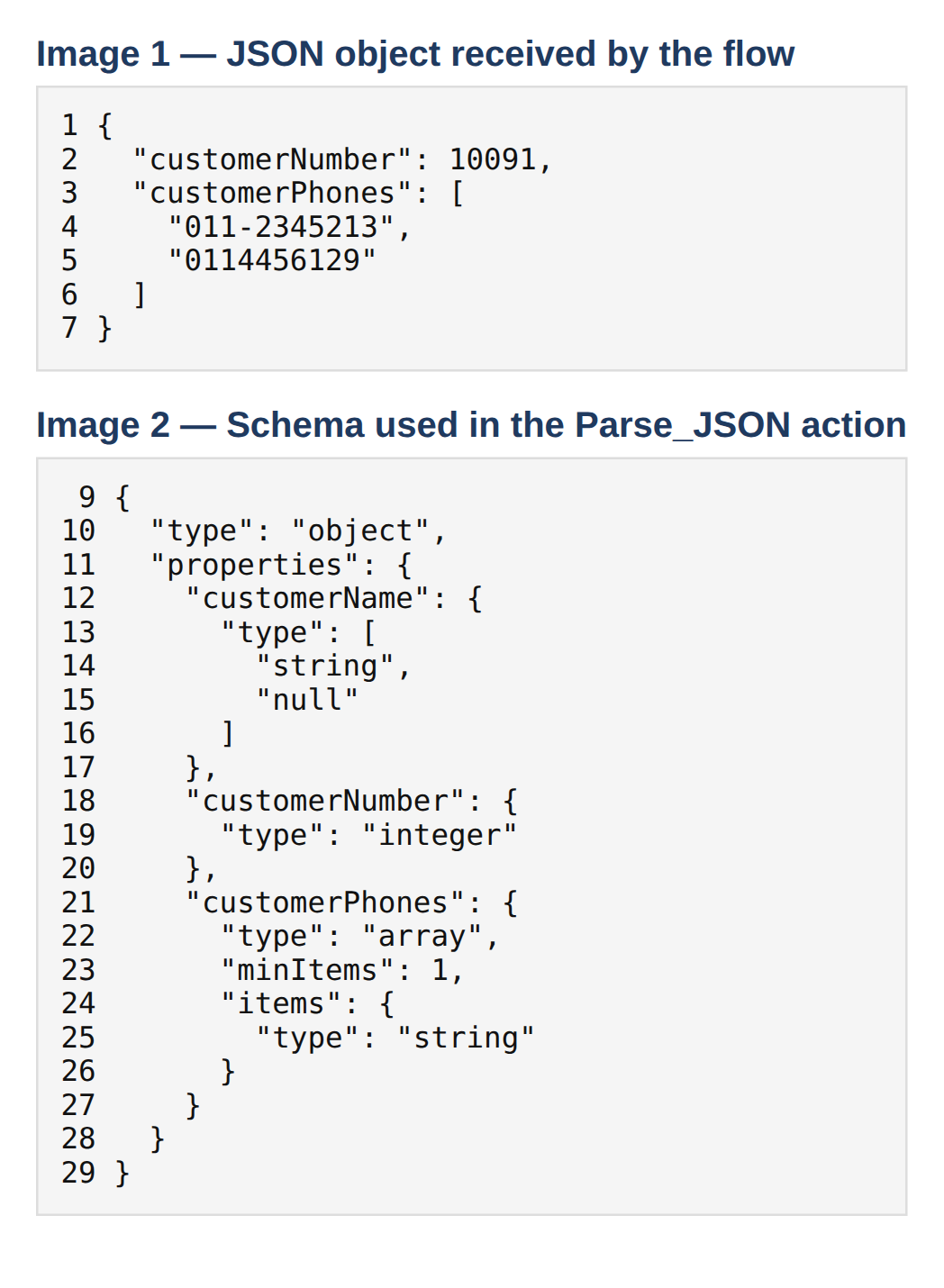
| Statement | Yes | No | |
|---|---|---|---|
| empty(body(‘Parse_JSON’)[‘customerName’]) returns true. | |||
| concat(body(‘Parse_JSON’).customerName, ‘:’, body(‘Parse_JSON’).customerNumber) returns 10091. | |||
| equals(body(‘Parse_JSON’)?.customerPhones[2], ”) returns true. | |||
| int(body(‘Parse_JSON’)?.customerPhones[1]) returns 0114456129. |
Show answer
For the first statement, because customerName does not exist in the JSON being parsed, referencing customerName causes an error, so true is not returned, making the answer “No”.
The second statement is also “No” because concat errors as soon as it references customerName.
For the third statement, arrays are zero-based, so customerPhones[2] is out of index and causes an error, making it “No”.
For the fourth statement, int() drops the leading zero, so 0114456129 is not returned as written, so the statement is correct and the answer is “Yes”.
Considerations for using functions
Q6.You are building an internal automation.
When a new record is created in a Microsoft Dataverse table, the same data must be automatically added to an enterprise resource planning (ERP) system.
However, this ERP system has no API.
You create this automation solution.
What should you use for each?
Select the appropriate option in the answer area.
Show answer
The one that can detect record creation in a Dataverse table and start processing is a cloud flow, which can be configured with Dataverse record creation as its trigger.
Therefore, the first answer is “Cloud flow”.
If the ERP system had an API, a cloud flow could integrate with it directly, but in this question, because no API exists, a desktop flow that can operate the screen to enter data is used to add data to the ERP.
Therefore, the second answer is “Desktop flow”.
Q7.You develop an automation solution for an enterprise and must package that solution.
What should you use for each?
Select the appropriate option in the answer area.
Show answer
You can distribute a solution by exporting one that contains only the required components and importing it into each environment.
To let a colleague edit and customize the contents in their personal development environment, you export it as an unmanaged solution.
On the other hand, when you want to deploy to a production environment and prevent any further changes, a managed solution, which does not allow direct editing of components, is appropriate.
Therefore, the first answer is unmanaged and the second is managed.
Solution concepts
Q8.A company has a customer relationship management (CRM) application that runs on an Azure virtual machine (VM).
You need a solution that automatically extracts general invoice data from documents received as email attachments and saves that data in the CRM application.
You design this solution.
In which order should you perform the actions?
Move all actions from the action list to the answer area and arrange them in the correct order.
Note: There are multiple correct orderings, and points are awarded according to whichever correct order you choose.
Drag (or tap) the required number of items from the “Options” on the left into the “Answer area” on the right. You can drag within the answer area to reorder them.
- Create a desktop flow.
- Create an instance of an invoice processing AI Builder model.
- Define input variables within the desktop flow.
- Define the logic that writes data to the CRM within the desktop flow.
- Create a cloud flow that extracts information from the model and triggers the desktop flow.
- Drag here
Show answer
Because you create the components that are referenced first, you build in the order of AI model -> desktop flow -> cloud flow.
First you create an instance of the invoice processing AI Builder model, then you create a desktop flow that calls it, and you implement the input variable definitions and the logic to write to the CRM.
Finally, you create a cloud flow that extracts information with the model and triggers the desktop flow.
The AI model and the desktop flow may be in either order, but the cloud flow is always last.
Q9.You need to implement a solution that manages order priority as follows.
– When an order is received, an order record is created in Dataverse.
– The priority must be registered in an internal system that has no API.
Which three actions should you perform, and in which order?
Move the appropriate actions from the action list to the answer area and arrange them in the correct order.
Drag (or tap) the required number of items from the “Options” on the left into the “Answer area” on the right. You can drag within the answer area to reorder them.
- Edit the desktop flow.
- Edit the cloud flow.
- Change the run action of the flow created in Power Automate for desktop.
- Change the desktop flow priority to high.
- Set the priority value based on the order volume.
- Set the desktop flow queue order based on the order volume.
- Select the desktop flow and choose “Move to top”.
- Drag here
Show answer
To automate order prioritization, you configure it in the following three steps.
First, you edit the cloud flow so that it triggers the desktop flow when an order record is created in Dataverse.
Next, to set the actual execution content, you change the run action of the flow created in Power Automate for desktop.
Finally, you define the logic that sets the priority value based on the order volume.
Because the internal system has no API, you register the data with a desktop flow that performs screen operations.
Q10.You plan to create a process map using Process Advisor and then create a cloud flow based on that process map.
You need to develop the cloud flow.
Which Process Advisor capabilities can you use for this?
Select two correct answers.
Each correct answer presents a complete solution.
Show answer
Process Advisor is a capability that visualizes business processes to find improvement points, and it cannot automatically build a cloud flow from a process map.
On the other hand, it can recommend opportunities for tasks that can be automated and suggest the connectors to use there.
Therefore, A, which suggests connectors, and C, which recommends automation opportunities, are correct.
Automatic flow generation (B) and input variable suggestion (D) are not Process Advisor capabilities.
Overview of process mining and task mining in Power Automate