Q1.A precision equipment manufacturer manages the parts inventory of two warehouses, WH1 and WH2, which are modeled as business units, in a Dataverse environment. The data of the two warehouses is processed individually for each part whose stock quantity is updated. The company wants to automate the process and push inventory updates based on orders received at the warehouses. You need to build the automation against Dataverse by using a Power Automate flow. You must also achieve this goal while keeping administrative effort to a minimum. Which flow do you recommend?
Show answer
Correct answer: E. One automated flow that queries the orders of both business units.
The Power Automate Dataverse trigger lets you set advanced options such as scope and filters. Specifying the scope lets you target only records owned by specific users or business units for the trigger. Therefore, setting the scope to the business unit meets the requirement without also using filters, so E is correct. A is also feasible to implement, but the added filtering configuration means it does not fit the requirement of keeping administrative effort to a minimum, so it is incorrect. Power Automate: “When a row is added, modified, or deleted” trigger
Log in to save your confidence level.
Q2PL-400
Q2.You need to select the data types for the required fields. Which data type should you use? To answer, select the appropriate option in the answer area. *Each correct answer is worth one point.
Division
End date
Tournament owner
Show answer
Correct answer: Choice / Date Only / Lookup
“Division” has a set of predefined possible values, so Choice is optimal. “End date” is a field that handles a date, so Date Only is suitable. For “Tournament owner,” it is appropriate to provide the owner as a separate table and hold a reference to it, so Lookup is optimal.
Log in to save your confidence level.
Q3PL-400
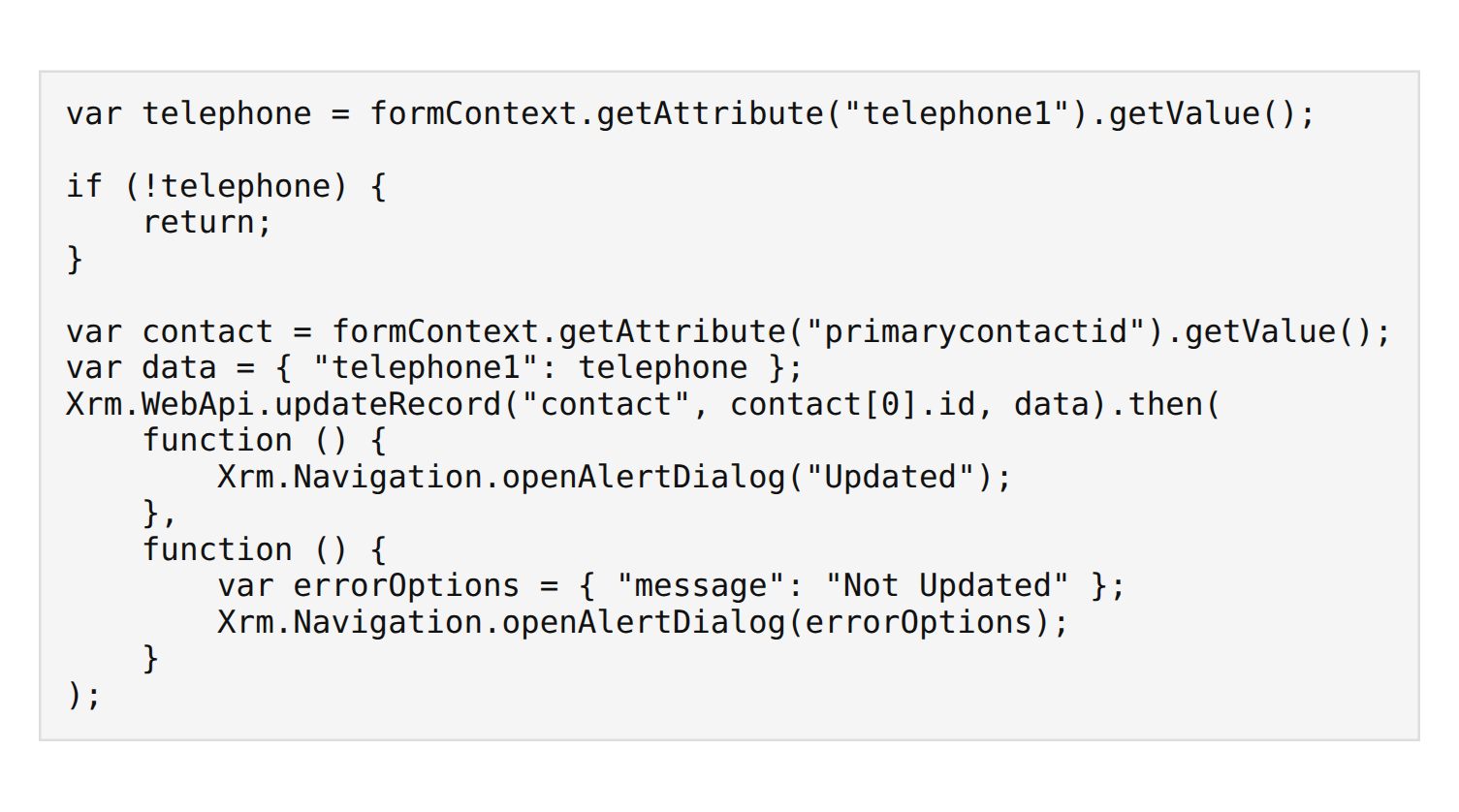
Q3.The following JavaScript code is implemented in a model-driven app. This code is bound to the OnChange event of the telephone (telephone1) column of the Account table.
var telephone = formContext.getAttribute("telephone1").getValue();

if (!telephone) {
    return;
}

var contact = formContext.getAttribute("primarycontactid").getValue();
var data = { "telephone1": telephone };
Xrm.WebApi.updateRecord("contact", contact[0].id, data).then(
    function () {
        Xrm.Navigation.openAlertDialog("Updated");
    },
    function () {
        var errorOptions = { "message": "Not Updated" };
        Xrm.Navigation.openAlertDialog(errorOptions);
    }
);
For each of the following statements, select [Yes] if the statement is correct, or [No] if it is not. *Each correct answer is worth one point.
Statement
Yes
No
If the code runs and a value is set in the primary contact (primarycontactid) column, the telephone (telephone1) column of the contact record is updated to match the account
If the code runs and no value is set in the primary contact (primarycontactid) column, an error message “Not Updated” is displayed
When the telephone (telephone1) value is deleted, the code runs and the telephone (telephone1) column of the contact record is updated to null
Statement 1: Unless values are present in both primarycontactid and telephone1, the telephone1 column of the contact record is not updated, so “Yes” is correct. Statement 2: If primarycontactid is null, an error occurs on the line that references contact[0].id, and the success/error callback is never reached, so “No” is correct. Statement 3: When the phone number is deleted, the if statement at the beginning returns immediately and updateRecord is not called, so “No” is correct.
Log in to save your confidence level.
Q4PL-400
Q4.A company is building a new system on Dataverse. You need to select features that meet the company’s requirements. Which option should you use? To answer, drag the appropriate option to the correct requirement. Each option may be used once, more than once, or not at all. *Each correct answer is worth one point.
Drag each option to the matching requirement’s drop zone, or tap to place it. Click a filled zone to send it back. (The same option may be used more than once.)
Visualize records as a hierarchy in a model-driven app
A record in one table must be able to reference only a single record in another table
Any record in one table must be able to be referenced by any record in another table
Show answer
Correct answer: Visualize records as a hierarchy in a model-driven app → Self-referential relationship / A record in one table must be able to reference only a single record in another table → One-to-many relationship / Any record in one table must be able to be referenced by any record in another table → Many-to-many relationship
If a table has a hierarchical self-referential relationship, you can use that hierarchy to configure hierarchy visualization in a model-driven app, so Statement 1 is “Self-referential relationship.” A relationship where a record in one table references only one record in another table is one-to-many, so Statement 2 is “One-to-many relationship.” A relationship where any records can mutually reference each other is many-to-many, so Statement 3 is “Many-to-many relationship.” Visualize hierarchical data with model-driven apps Table relationships
Log in to save your confidence level.
Q5PL-400
Q5.An apparel store uses a Power Apps app to interact with customers, and the customer data is stored in Microsoft Dataverse. The store offers discounts to customers and assigns a group discount to all customers within a category. The applicable group discount is added on top of the customer-specific discount. Discount information is stored in the group discount (store_groupdiscount), personal discount (store_personaldiscount), and total discount (store_totaldiscount) columns. When an order’s total discount exceeds 30%, a manager must approve the order before it is fulfilled and shipped. You need to create a flow that notifies the manager when approval is required. How should you configure the flow’s trigger? To answer, select the appropriate option in the answer area. *Each correct answer is worth one point.
Specifying the total discount column (store_totaldiscount) as the trigger’s filtering attribute lets the flow start only when that column is updated. Furthermore, the trigger condition determines whether the total exceeds 30%, and the value of the record that triggered the flow is correctly obtained from triggerOutputs. Therefore, the filtering attribute is store_totaldiscount, and the trigger condition using triggerOutputs is correct. Filter conditions
Log in to save your confidence level.
Q6PL-400
Q6.You have Dataverse and a model-driven app, and the model-driven app integrates with an external system. You plan to run business logic each time a record is created in the model-driven app. However, running that business logic must not negatively affect users of the model-driven app. You need to implement this business logic. What should you use?
Show answer
Correct answer: C. An asynchronous plug-in registered in the PostOperation stage
With asynchronous processing, users do not have to wait on screen for the processing to complete, so you can avoid negatively affecting users. Therefore, an asynchronous plug-in registered in the PostOperation stage is appropriate, and C is correct. PreOperation and PostOperation represent the plug-in’s execution timing (before or after the record is saved), and there is also a PreValidation timing. Synchronous processing makes users wait, so it does not meet the requirement. Event execution pipeline
Log in to save your confidence level.
Q7PL-400
Q7.A university has adopted Dataverse. Several departments use opportunity records to bid for funding for their own projects. Each department’s opportunities cannot be viewed by other departments. However, two departments may sometimes need to collaborate on the same opportunity. You need to configure security to meet the business requirements. For each of the following statements, select [Yes] if the statement is correct, or [No] if it is not. *Each correct answer is worth one point.
Statement
Yes
No
Share an individual opportunity that a member of one department is working on with all members of the second department, and grant those members the appropriate permissions
Create a security role with organization-level access to opportunities and grant that role to all members of the two departments that need access
Use position hierarchy security and define the two departments as positions
The requirement is that departments are basically private to each other, but the same opportunity can be shared only when two departments collaborate. Therefore, the correct scenario is to keep the default private and grant exceptional access via record sharing when needed, so Statement 1 is “Yes.” Granting organization-level access to everyone would always make it visible to other departments too, violating the requirement, so Statement 2 is “No.” Position hierarchy is sharing based on superior/subordinate relationships and does not fit this requirement, so Statement 3 is also “No.”
Log in to save your confidence level.
Q8PL-400
Q8.A company has a Dataverse environment. The company creates model-driven apps for various audiences so that users can manage and monitor projects. Users on the finance team report that the current app does not include all the required entities and that cost information is missing from the existing project form. Cost information must be visible only to finance team users. A security role for finance team users has already been created. You need to create a new app for finance team users. Which four actions should you perform, and in which order? To answer, move the appropriate actions from the list of actions to the answer area and arrange them in the correct order.
Drag (or tap) the required number of items from the “Options” on the left into the “Answer area” on the right. You can drag within the answer area to reorder.
Options
Edit the project main form. Select Save As to create a new finance form, add the missing cost columns, and remove columns not related to finance.
Share the finance app in Power Apps and select the finance security role.
Create a new model-driven app. Add the Project table and select the finance security role.
Create a new model-driven app. Add the Project table and select the finance form.
Enable security roles and select the finance security role on the finance form.
Select the finance app from the My Apps page and configure the app to use the finance security role.
Answer area (execution order from top)
Drag here
Show answer
Correct answer: The correct order: ①Edit the project main form. Select Save As to create a new finance form, add the missing cost columns, and remove columns not related to finance. → ②Enable security roles and select the finance security role on the finance form. → ③Create a new model-driven app. Add the Project table and select the finance form. → ④Share the finance app in Power Apps and select the finance security role.
First, create a finance form that includes the cost columns, then assign the finance security role to that form to restrict its display. Next, create a new model-driven app and add the created finance form to that app. Finally, sharing the finance app with the finance security role in Power Apps meets the requirement that only finance team users can view cost information.
Log in to save your confidence level.
Q9PL-400
Q9.You are creating a Web API. This API must be able to perform the following actions. – Create a row in a Microsoft Dataverse table – Update a column of an existing row Which HTTP methods should you use? To answer, drag the appropriate HTTP method to the correct requirement. Each HTTP method may be used once, more than once, or not at all. *Each correct answer is worth one point.
Drag each option to the matching requirement’s drop zone, or tap to place it. Click a filled zone to send it back. (The same option may be used more than once.)
GET POST PATCH ACCEPT
Create a row
Update a column of an existing row
Show answer
Correct answer: Create a row → POST / Update a column of an existing row → PATCH
In the Dataverse Web API, you use POST to create a new row and PATCH to update an existing row. Therefore, POST corresponds to the requirement to create a row, and PATCH to the requirement to update a column of an existing row. GET is for retrieval, and ACCEPT is a header rather than an HTTP method, neither of which is used for this purpose. Create a table row using the Web API Update and delete table rows using the Web API
Log in to save your confidence level.
Q10PL-400
Q10.You are creating a package for a Power Platform solution. The package includes custom code and sample data. The package must include all files required for installation. You need to configure the package for this purpose. Which settings should you use? To answer, select the appropriate option in the answer area.
By editing PackageTemplate.cs (or PackageImportExtension.cs) in the root folder, you can incorporate custom code into the package. On the other hand, ImportConfig.xml describes information about the solutions and data to import. Therefore, edit PackageTemplate.cs for custom code and ImportConfig.xml for sample data. Add custom code ImportConfig reference