
Q1.You operate a Teams Phone environment that has users in both Canada and the United States.
You have deployed one session border controller (SBC) in Calgary and another SBC in New York City, and both SBCs are connected to Direct Routing.
You plan to implement toll bypass for the Canadian users.
The configuration must meet the following requirements.
For calls to phone numbers within the United States, the New York City SBC must be used preferentially.
If the New York City SBC is unavailable, the Calgary SBC must be used to maintain resiliency.
You create a PSTN usage named Canada and associate it with a voice routing policy.
Select the two voice routes that you should create by using this Canada PSTN usage.
Each correct answer presents part of the solution.
Show answer
You prepare two voice routes that use the same number pattern matching U.S. phone numbers.
When you associate the priority 1 route with the New York City SBC, it is normally selected first.
By associating the priority 2 route with the Calgary SBC, it serves as a backup when the New York City SBC is unavailable.
A wildcard route would also target non-U.S. numbers and exceed the requirements, so it is not appropriate.
When multiple routes match, they are tried in order starting from the route with the lowest priority value.
Configure call routing for Direct Routing
Manage call routing policies for Direct Routing
Q2.You have a Microsoft Teams Phone environment that operates in the United States.
You need to configure the environment so that an emergency call placed by a user to 9911 is routed to 911 and is correctly identified as an emergency call.
What should you configure?
Show answer
An emergency call routing policy lets you define an emergency dial string and an emergency dial mask.
When you set the emergency dial string to 911 and the emergency dial mask to 9911, 9911 is translated to 911, identified as an emergency call, and sent to the specified PSTN route.
An emergency calling policy mainly controls the notification behavior toward security personnel and does not perform number translation.
An outbound PSTN number translation rule shapes the number format passed to the SBC in Direct Routing and cannot be used to identify an emergency call.
Manage emergency call routing policies for Direct Routing
Q3.[Outdated question] A company plans to host a Microsoft Teams live event for a specific group of users.
As part of the initial setup, you need to assign roles to the members of the event group.
The members must perform the following tasks.
Invite attendees.
Moderate the Q&A.
Start and stop the live event.
Which is the least-privileged role that can perform each task?
To answer, drag the appropriate role to the correct task.
Each role may be used once, more than once, or not at all.
Drag each option to the matching requirement’s drop zone, or tap to place it. Click a filled zone to send it back. (The same option may be used more than once.)
Organizer
Presenter
Producer
Show answer
The organizer creates the event, sets attendee permissions, and sends invitations, so the organizer is required for invitations.
Moderating the Q&A can also be performed by a presenter, so the presenter, which has fewer privileges than the producer, is the least-privileged role.
A producer is required to control the broadcast stream and to start and stop the live event.
Therefore, you assign the organizer for invitations, the presenter for the Q&A, and the producer for start and stop.
Note that Teams live events are being retired on June 30, 2026, and migration to the successor, Teams town halls, is required.
Get started with Microsoft Teams live events
Moderate a Q&A in a live event in Microsoft Teams
Q4.Microsoft Teams Phone is deployed.
You deploy a new network site.
You find that this new site does not appear in the location-based reports, while the other sites do appear.
You need to ensure that all sites appear in the reports.
What should you do?
Show answer
The CQD location-enhanced reports identify each network site based on the uploaded subnet and building information.
You cannot combine information from multiple building data files within the same effective period.
When you add a new site, you must re-upload a complete CSV file that includes both the existing sites and the new site.
Network Planner is a feature for modeling network requirements and does not update the CQD location information.
Therefore, an additional upload of a CSV that includes only the new site cannot meet the requirement.
Building and endpoint data
What is Call Quality Dashboard (CQD)?
Q5.You have a Teams Phone deployment.
You have a Survivable Branch Appliance (SBA) with local public switched telephone network (PSTN) connectivity.
This SBA is deployed at a remote site.
Which features require internet connectivity to function? Select two that apply.
Each correct answer presents a complete solution.
Show answer
With the SBA at the time this question was written, dynamic emergency calling (E911) and call forwarding settings were not available during an internet outage, so the expected answers are A and E.
Media bypass is a prerequisite configuration for the SBA to function and flows media locally between the client and the SBC, so it is not C.
Note that in the current Microsoft Learn, basic emergency calling is possible with only location sharing restricted, and call forwarding to a single phone number or to a Teams user is also supported.
Therefore, note that under the current specification the premise of this question does not hold as-is.
Survivable Branch Appliance (SBA) for Direct Routing
Q6.Microsoft Teams Phone is deployed.
You need to recommend a Teams integration solution that meets the following requirements.
Notify waiting callers of their position in the queue.
Integrate with Teams by using the Teams Graph API and the cloud communications API without using Direct Routing.
Allow supervisors to listen to and barge in on the in-progress inbound and outbound calls of Teams agents.
Which integration solution and integration type should you recommend?
To answer, select the appropriate options in the answer area.
Show answer
Notifying callers of their queue position and listening to or barging in on in-progress calls are features of Teams Contact Center, which manages agents and supervisors.
The Extend model integrates with Teams by using an Azure bot, the Teams Graph API, and the cloud communications API of Microsoft Graph, and does not require Direct Routing.
The Connect model uses a certified SBC and Direct Routing, so it does not meet the requirements.
Currently, a Unify model based on Azure Communication Services has also been added, but the Extend model is appropriate for this question.
Contact center integration for Microsoft Teams
Q7.You have a Teams Phone deployment with offices in Brisbane and Melbourne.
You deploy a new session border controller (SBC) named SBC2 in the Brisbane office.
You need to configure the environment so that only emergency calls from users in the Brisbane office use SBC2.
Select two actions that you should perform.
Each correct answer presents part of the solution.
Show answer
To send emergency calls through a specific SBC, you create an emergency call routing policy that associates a PSTN usage and a voice route that use SBC2.
Then, by assigning this policy only to the Brisbane users, you can route only the emergency calls of the targeted users through SBC2.
An emergency calling policy controls how security personnel are notified and external location lookup, and it does not specify the SBC path to use.
Therefore, creating a new emergency call routing policy and assigning it to the Brisbane users are the correct answers.
Assigning a dial plan or an emergency calling policy does not contribute to specifying the route.
Manage emergency call routing policies for Direct Routing
Plan and configure dynamic emergency calling
Q8.You have a Microsoft 365 subscription that uses Microsoft Teams and contains the groups shown in the following table.
There are two groups, Research and Marketing; Research is a security group and Marketing is a distribution list.
A user named User1 is a member of both Research and Marketing.
The meeting policies are Global (Org-wide default), Policy1, and Policy2, and Policy1 and Policy2 are custom.
In the group policy assignments, rank 1 is Marketing with Policy2, and rank 2 is Research with Policy1.
Which policy is assigned to User1?
| Name | Type |
|---|---|
| Research | Security |
| Marketing | Distribution |
| Name | Custom |
|---|---|
| Global (Org-wide default) | No |
| Policy1 | Yes |
| Policy2 | Yes |
| Rank | Group | Assigned policy |
|---|---|---|
| 1 | Marketing | Policy2 |
| 2 | Research | Policy1 |
Show answer
User1 belongs to both Research, which is assigned Policy1, and Marketing, which is assigned Policy2.
When a user inherits the same type of policy from multiple groups they belong to, the one with the highest group policy assignment rank takes effect.
Because a lower rank number means higher priority, Policy2 assigned to Marketing at rank 1 is applied.
When a user inherits a custom policy from a group, the global policy is not used together with it.
Note that both security groups and distribution lists can be used for group policy assignment.
Assign policies in Teams – getting started
Assign policies to users and groups
Q9.You have a Microsoft Teams Phone deployment that uses an auto attendant.
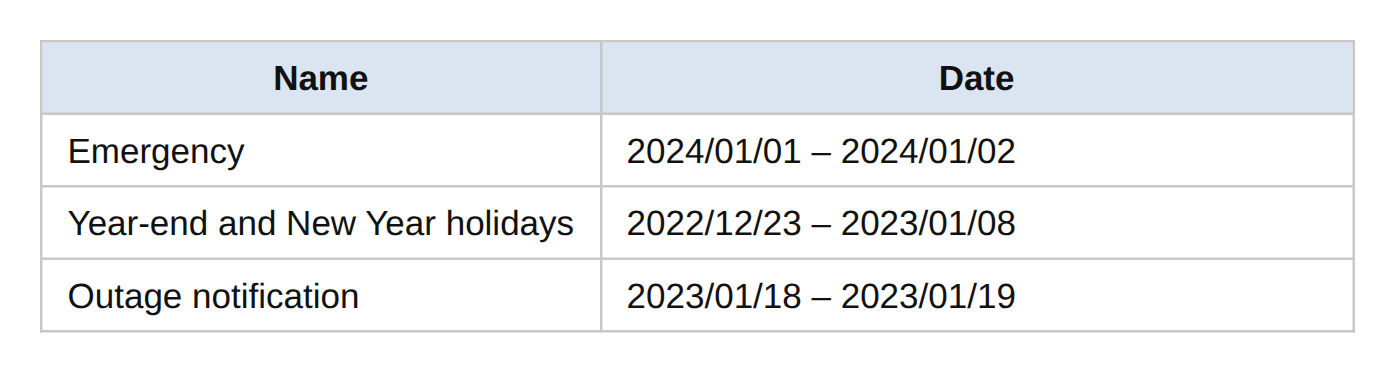
The holiday call settings are configured as shown in the table.
The emergency settings are configured as shown in the emergency exhibit, the year-end and new-year holiday settings as shown in the holiday exhibit, and the outage notification settings as shown in the outage exhibit.
For each of the following statements, select Yes if the statement is true; otherwise, select No.
| Name | Date |
|---|---|
| Emergency | 2024/01/01 – 2024/01/02 |
| Year-end and new-year holiday | 2022/12/23 – 2023/01/08 |
| Outage notification | 2023/01/18 – 2023/01/19 |
| Statement | Yes | No | |
|---|---|---|---|
| When a caller places a call on January 1, 2024, the call is forwarded to voicemail. | |||
| When a caller places a call on January 18, 2023, the call is automatically forwarded to T-AA. | |||
| When a caller places a call on December 25, 2022, a greeting message is played to the caller. |
Show answer
January 1 applies the emergency holiday flow, but the forwarding target is an external phone number, not voicemail.
Therefore, statement 1 is “No.”
The outage notification on January 18 plays a menu, and forwarding to T-AA requires the caller to press “1,” so it is not an automatic forward, and statement 2 is also “No.”
December 25 falls within the year-end and new-year holiday period, and the configured greeting is played before the call is disconnected, so a greeting message is played and statement 3 is “Yes.”
In an auto attendant, after the greeting is played, one of the following is performed: disconnect, redirect, or play a menu.
Set up – Auto attendant
Set up – Holidays
Q10.You have a Microsoft 365 subscription that uses Microsoft Teams.
You need to configure a new auto attendant that answers incoming calls and forwards them to the appropriate recipients.
The solution must minimize administrative effort.
Select two actions that you should perform.
Each correct answer presents part of the solution.
Show answer
To guide callers with an auto attendant and forward them to the appropriate recipients, you configure a greeting message to play to callers and call routing to specify the forwarding targets and menu.
There is no requirement to handle calls differently during and outside business hours, and there is no requirement to distribute incoming calls to multiple agents in sequence, so business-hours flows and a call queue are not needed.
A resource account is required when calling the auto attendant directly from a phone number, but this question does not require creating one, so the correct answers are B and C.
Set up – Auto attendant
Manage – Resource accounts for Teams phone agents, auto attendants, and call queues