
Q1.The company you work for has a Microsoft 365 subscription.
You are planning to configure the environment so that an external partner company can collaborate in Microsoft Teams using guest access.
As part of this effort, you introduce a new security policy that includes the following requirements.
Collaboration in Microsoft Teams must allow connections only from guest users that belong to specific domains.
Guest users must be prevented from inviting other guests.
You need to propose a solution that meets these security policy requirements.
Solution: You modify the external collaboration settings in Azure Active Directory.
Does this meet the goal?
Show answer
In the external collaboration settings, you can specify the domains for which guest invitations are allowed or blocked, so that only guests from specific domains are permitted.
In addition, the guest invitation settings let you control who within the organization can invite guests, so the requirement to prevent guest users from inviting other guests can also be met.
Note that Azure Active Directory has now been renamed to Microsoft Entra ID, but this functionality continues as part of External ID and the external collaboration settings.
Therefore, this solution of modifying the external collaboration settings in Microsoft Entra ID is correct.
Configure B2B external collaboration settings in Microsoft Entra External ID
Q2.Your organization runs Microsoft Teams.
You are developing a governance strategy for Microsoft Teams.
All tasks must be performed by a user who is assigned the Global Administrator role, not by a team owner.
– Archive a team
– Restore a deleted team
– Permanently delete a team
You need to specify the administrative tool to use for each task.
Drag the appropriate tool to the correct task.
Each tool may be used once, more than once, or not at all.
To view the content, you may need to drag the split bar between panes or scroll.
Drag each option to the matching requirement’s drop zone, or tap to place it. Click a filled zone to send it back. (The same option may be used more than once.)
Microsoft 365 admin center
Microsoft Teams desktop client
Show answer
A deleted team can be restored by restoring its underlying Microsoft 365 group, so you restore it from “Deleted groups” in the Microsoft 365 admin center.
Archiving and deleting a team, on the other hand, can be performed from the “Teams” management page in the Microsoft Teams admin center.
The “Microsoft team” in the question refers to Microsoft Teams, which still uses the same name today.
The key point is that, because the tasks are performed by a Global Administrator rather than a team owner, you use the admin centers instead of the Teams desktop client.
Therefore, the Microsoft 365 admin center is appropriate for restoring, and the Microsoft Teams admin center for archiving and permanently deleting.
Restore a deleted Microsoft 365 group
Archive or delete a team in Microsoft Teams
Q3.You have a Microsoft 365 subscription.
You plan to deploy Microsoft Teams.
You need to determine where the Teams service workloads store data at rest.
What should you review in the Microsoft 365 admin center?
Show answer
Where data is stored at rest in Microsoft 365 is reviewed from the Organization profile in the Microsoft 365 admin center.
The data residency card, or Data location, shows the storage location for each service, such as Exchange Online, SharePoint, and Microsoft Teams.
Search & intelligence is for configuring search, Security & privacy is for the organization’s basic security settings, and Service health is used to check outages and maintenance, so none of these apply to the purpose of this question.
Therefore, the place to review the data-at-rest location for the Teams service workload is the Organization profile tab in Org settings.
Where is your Microsoft 365 customer data stored?
Q4.Microsoft Teams has been deployed.
Several users report that the Teams client on their Windows devices fails to automatically update to the latest release.
Which of the following is causing this issue?
Show answer
The update behavior of the Teams client can be controlled by the Teams update policy in the Teams admin center.
In particular, if the settings for update channels such as “latest release” or public preview are not appropriate, they can cause users’ Teams clients not to update to the latest release as expected.
The Teams upgrade settings mainly relate to migration from Skype for Business to Teams, and config.office.com is used for cloud policy management of Microsoft 365 Apps.
Therefore, in this question the cause is a misconfiguration of the Teams update policy.
Teams settings and policies reference
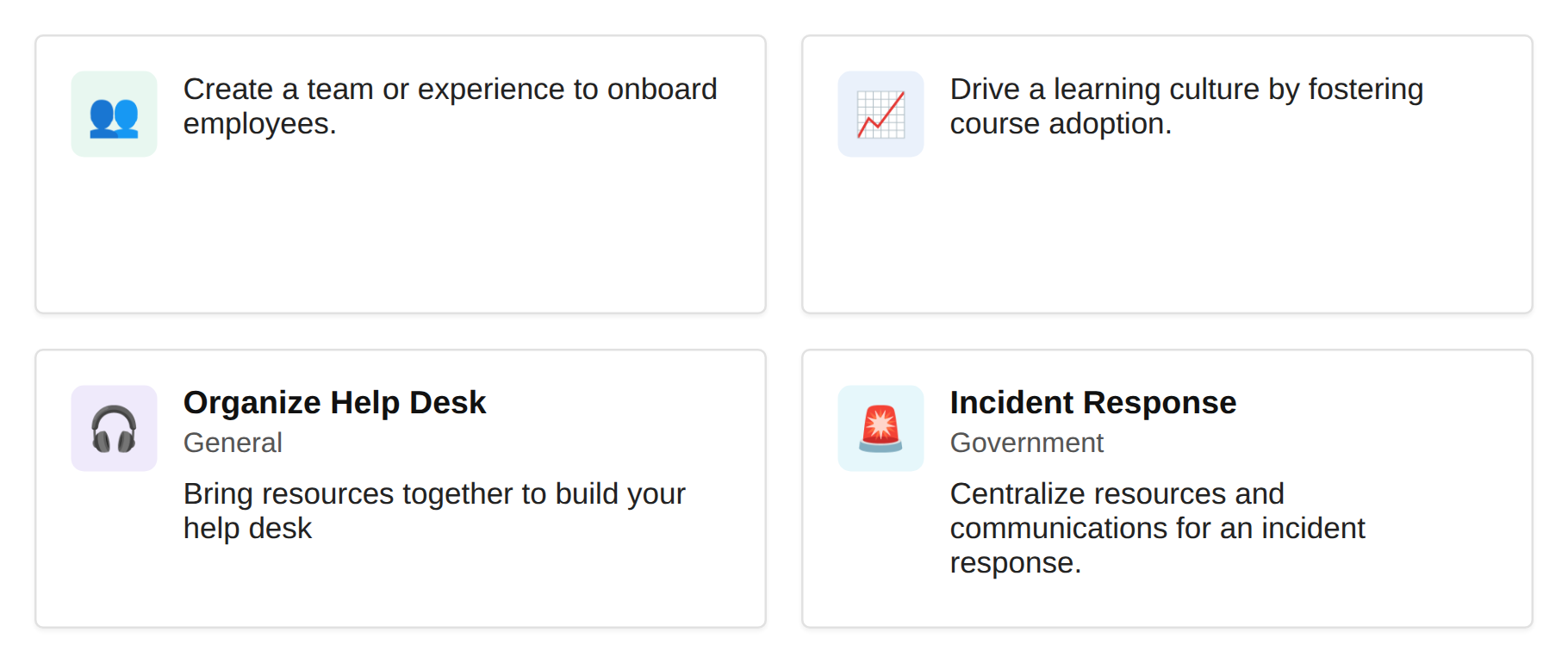
Q5.You need to ensure that users see only the “Manage a Project” template.
What should you do?
Show answer
In Microsoft Teams, the team templates shown to users can be controlled with template policies.
Using a template policy in the Microsoft Teams admin center, you can show or hide specific templates, so you can meet the requirement of showing users only the “Manage a Project” template.
Modifying a team template itself edits the template’s content, not the control of which templates are displayed.
Therefore, the option to modify a template policy in the Microsoft Teams admin center is correct.
Manage team templates in the admin center
Q6.You are assigned the Groups Administrator role.
You notice that you cannot create an expiration policy in Microsoft 365.
You need to create an expiration policy.
The solution must apply the principle of least privilege.
What should you do first?
Show answer
Creating an expiration policy for Microsoft 365 groups requires a license that enables the relevant feature in Microsoft Entra ID, but the question states that you are already a Groups Administrator and still cannot create it.
According to Microsoft’s documentation, creating an expiration policy requires Global Administrator or User Administrator privileges.
Among the options, the one that most closely aligns with least privilege while still meeting the requirement is to request the Global Administrator role.
Note that Azure AD has now been renamed to Microsoft Entra ID.
Microsoft 365 group expiration policy
Q7.Your company uses Microsoft Teams.
All users are assigned a Microsoft 365 E5 license.
For highly sensitive Teams meetings, you need to purchase an add-on license that lets users apply a sensitivity label to control end-to-end encryption.
Which add-on license should you purchase?
Show answer
To use sensitivity labels to control Teams meeting settings, you need compliance capabilities such as Microsoft Purview Information Protection.
Microsoft 365 E5 Compliance is now offered as the Microsoft Purview Suite and includes information protection features such as sensitivity labels.
Microsoft Teams Premium also provides advanced meeting protection, but this question is about applying a sensitivity label to control end-to-end encryption for meetings.
Therefore, the required add-on is Microsoft 365 E5 Compliance.
Use sensitivity labels to protect calendar items, Teams meetings, and chat
Require end-to-end encryption for sensitive Teams meetings
Q8.Your company has a Microsoft Office 365 subscription.
Users in the company’s sales department frequently invite guest users to meetings.
When a sales department user invites a guest user to a meeting, you need to ensure that the guest user is automatically admitted by default.
This solution must apply only to sales department users.
Which two actions should you perform?
Each correct action presents part of the solution.
Note: Each correct selection is worth one point.
Show answer
A Teams meeting policy lets you control which users can bypass the lobby and join a meeting automatically.
Because the requirement is to apply this only to sales department users, changing the global meeting policy would affect the entire company and is inappropriate.
First, create a new meeting policy in which everyone, including guests, is automatically admitted.
Then, by assigning that meeting policy to the sales department users, you can limit the scope to the sales department and meet the requirement.
Microsoft Office 365 is now treated as part of Microsoft 365.
Teams settings and policies reference
Assign policies to users and groups
Q9.Your company uses Microsoft Teams.
You are assigned the Teams Communications Support Specialist role.
You notice that you cannot read activity reports in the Microsoft 365 admin center.
You need to assign a role that can view activity reports.
The solution must follow the principle of least privilege.
Which role should you assign to yourself?
Show answer
The Teams Communications Support Specialist is a limited role for handling call quality and basic user troubleshooting information, and is not sufficient to view activity reports in the Microsoft 365 admin center.
The Teams Communications Administrator can view the related reports in addition to managing Teams calls, meetings, and voice, so it meets the requirement to view activity reports.
The Global Administrator has excessive privileges, and the Teams Administrator is mainly for managing teams and channels.
Therefore, from the standpoint of least privilege, the Teams Communications Administrator is appropriate.
Use Microsoft Teams administrator roles to manage Teams
Q10.Your company has a Microsoft 365 subscription.
Users invite external users to Microsoft Teams meetings by using Microsoft Outlook meeting invitations.
However, the external users cannot join the meetings.
You need to ensure that all external users can join Microsoft Teams meetings.
What should you do from the Microsoft Teams admin center?
Show answer
When external users join a Teams meeting through an Outlook meeting invitation, they may not be registered as guests of the organization.
In that case, in the meeting settings of the Teams admin center, you need to allow anonymous users to join meetings.
Guest access is intended for collaboration on internal resources, such as joining teams and channels, and differs from the setting that lets external participants join through a meeting invitation alone.
Therefore, the option to allow anonymous join in the meeting settings is correct.
Manage anonymous participant access to Teams meetings, webinars, and town halls
Teams settings and policies reference