
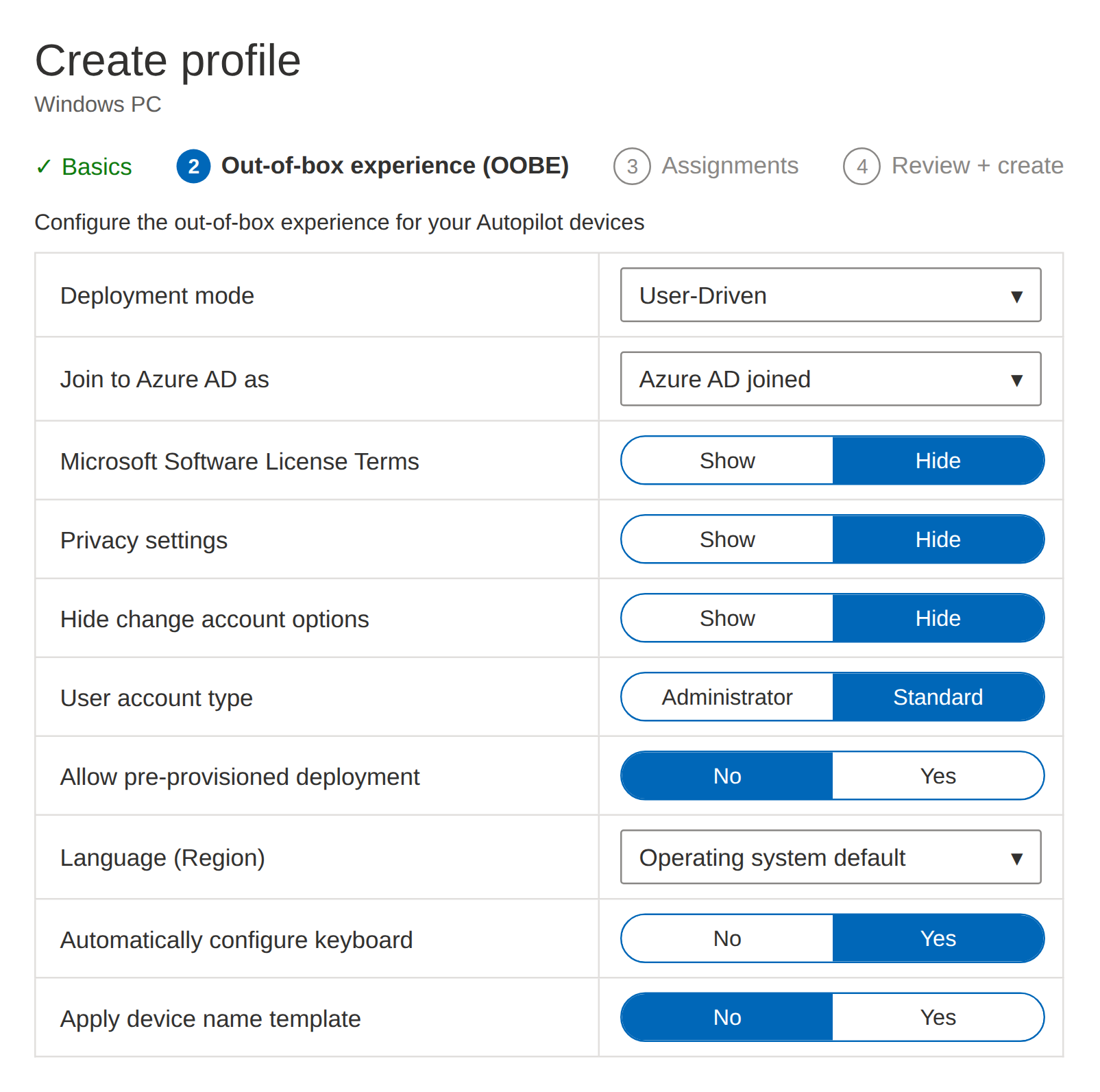
Q1.Your organization runs an on-premises Active Directory domain synchronized with Microsoft Entra ID, and you have created the Windows Autopilot deployment profile shown in the following figure.
Based on the information provided, select the best option from each dropdown menu to complete each statement.
Show answer
As a prerequisite for applying the profile, you must first import a CSV file containing the target devices’ hardware hashes into Windows Autopilot to register them.
In the deployment profile shown in the figure, “Join to Azure AD as” is set to Azure AD joined (now called Microsoft Entra joined).
Therefore, after the profile is applied, the device will be joined to Microsoft Entra ID only and will not join the on-premises Active Directory.
A device becomes associated with both Active Directory and Entra ID only when the join type is set to Microsoft Entra hybrid joined; note that even if the tenant has a hybrid configuration, the profile setting takes precedence.
Overview of Windows Autopilot user-driven Microsoft Entra join in Intune | Microsoft Learn
Q2.A company uses a Microsoft 365 tenant and has enrolled several devices in Microsoft Intune.
An administrator created a Conditional Access policy named “Policy1” and assigned it to a group named “Group1”.
Policy1 restricts access to Microsoft OneDrive for Business from devices that are determined to be noncompliant.
You need to identify the noncompliant devices that are attempting to access OneDrive for Business.
What should you do?
Show answer
Because Policy1 controls access to OneDrive for Business through Conditional Access, the Conditional Access insights and reporting workbook is the appropriate place to identify the relevant noncompliant devices.
This workbook lets you analyze the impact of the policies applied to sign-ins from perspectives such as user, app, and device state.
A plain compliance list cannot correlate OneDrive access attempts with policy evaluation.
Note that Azure Active Directory has been renamed to Microsoft Entra ID.
Conditional Access insights and reporting workbook – Microsoft Entra ID | Microsoft Learn
Q3.Your internal network contains an Active Directory domain named contoso.com.
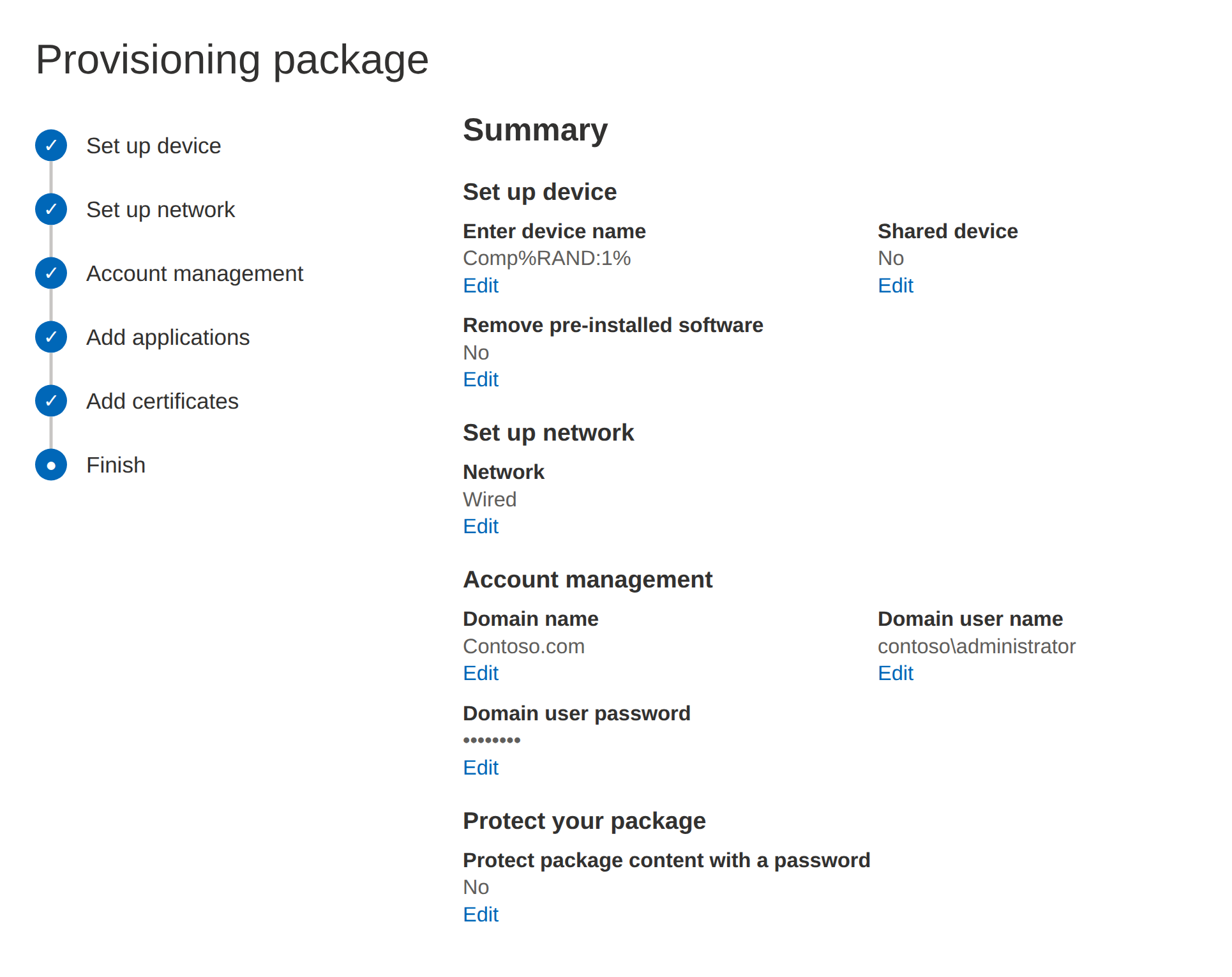
If you create a provisioning package named Package1 as shown in the following figure, what is the maximum number of devices on which Package1 can run successfully?
Show answer
In Windows Configuration Designer, the device name is specified as Comp%RAND:1%.
%RAND:1% generates a single-digit random value, so the possible values are 0 through 9, which is 10 combinations.
Because computer names must be unique within an Active Directory domain, the maximum number that can run successfully without a name collision is 10.
Therefore, the maximum number of devices is 10.
Bulk enrollment for Windows devices – Microsoft Intune
Q4.You have a Microsoft 365 subscription.
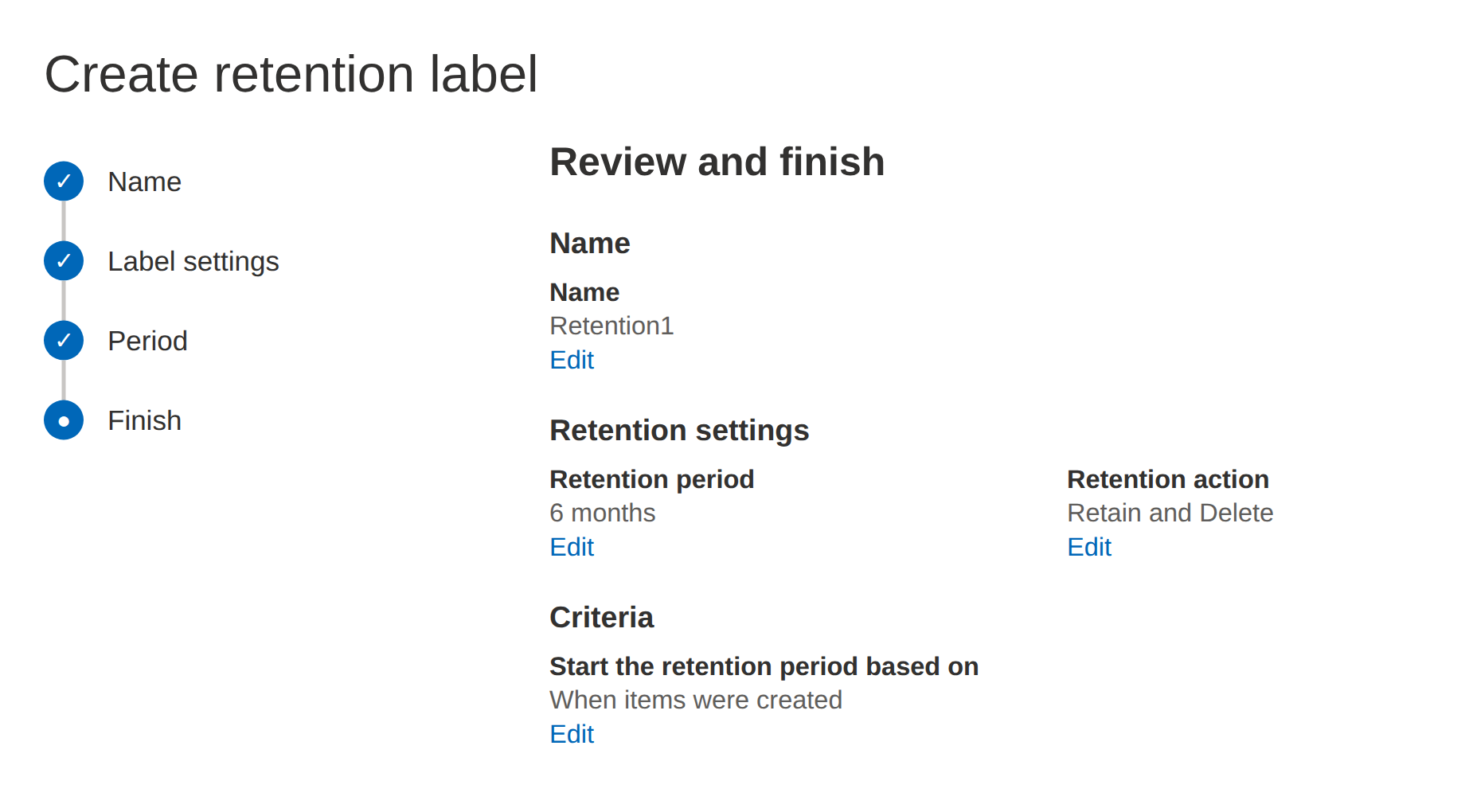
You create a retention label named Retention1 as shown in the following figure.
You apply Retention1 to all OneDrive content.
On January 1, 2020, a user saves a file named File1 to OneDrive.
On January 10, 2020, the user edits File1.
On February 1, 2020, the user deletes File1.
When will File1 be permanently deleted from OneDrive and become unrecoverable?
Show answer
Retention1 is configured to delete content after a 6-month retention period, and the starting point of the retention period is the creation date.
Therefore, File1’s retention deadline is six months after January 1, 2020, which is July 1, 2020.
The edit on January 10 does not change the start date, and even though the user deletes the file on February 1, the retain-then-delete behavior keeps it retained, and it is permanently deleted after the deadline arrives.
It is important to remember that the retention period is calculated based on the start date.
Configure Microsoft 365 retention settings to automatically retain or delete content | Microsoft Learn
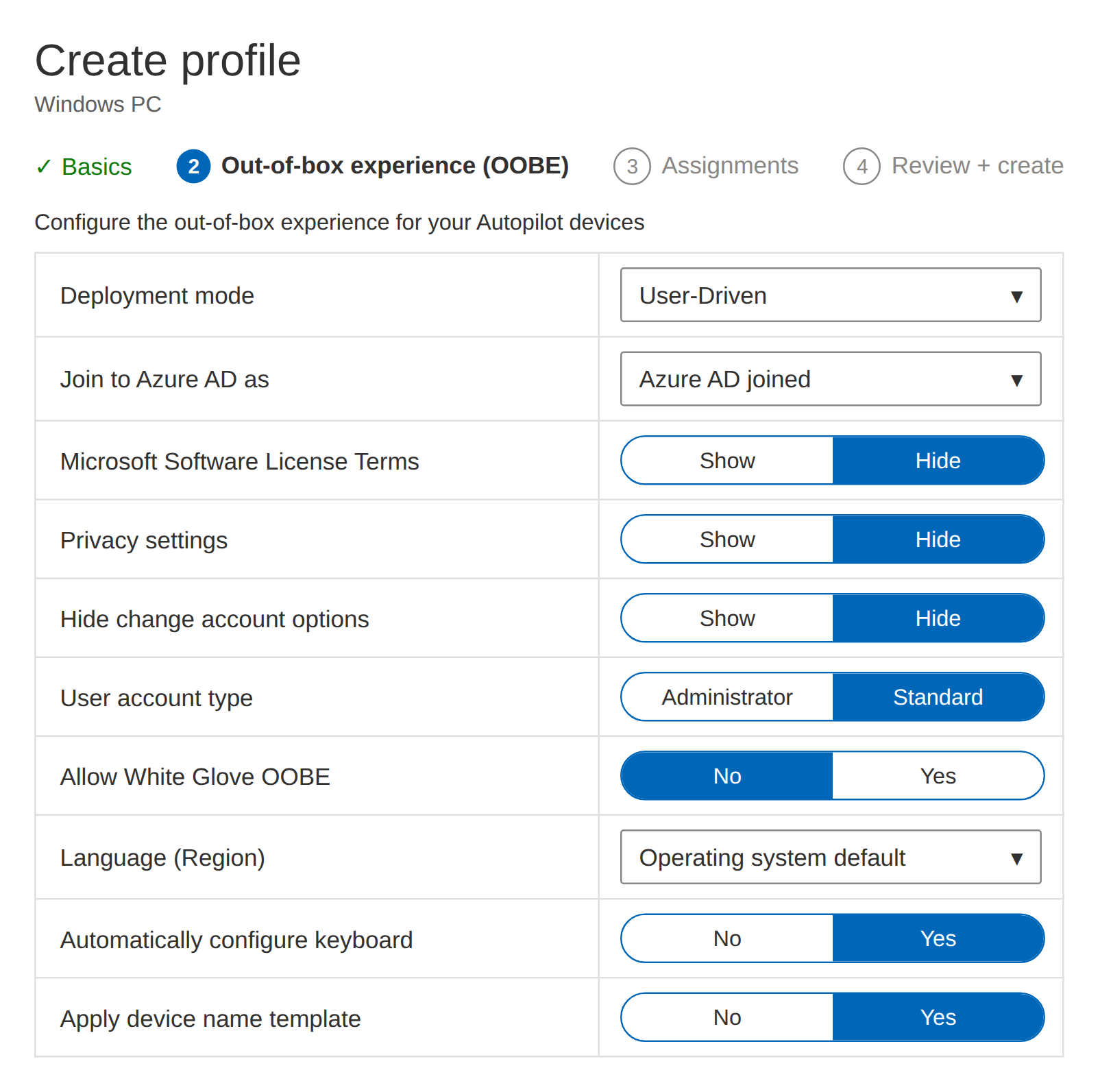
Q5.You create a Windows Autopilot deployment profile.
You need to configure the profile settings to meet the following requirements.
Automatically enroll new devices and provision system apps.
Require end-user authentication.
Include the hardware serial number in the computer name.
Which two settings should you configure?
Show answer
To meet the end-user authentication requirement, you must set Deployment mode to User-Driven, which requires user credentials during enrollment.
Self-deploying mode does not prompt for credentials, so it does not meet the requirement.
In addition, to include the serial number in the computer name, enable Apply device name template and use the %SERIAL% macro.
Therefore, the two settings you must configure are Deployment mode and Apply device name template.
Configure Windows Autopilot profiles | Microsoft Learn
Q6.You have the devices shown in the following table.
You plan to implement Microsoft Defender for Endpoint in these environments.
You need to identify which devices can be onboarded to Microsoft Defender for Endpoint.
What should you identify?
| Name | Operating system | Domain member |
|---|---|---|
| Device1 | Windows 8.1 Enterprise | Yes |
| Device2 | Windows 10 Pro | No |
| Device3 | Windows 10 Enterprise | Yes |
| Device4 | Mac OS X | No |
Show answer
Microsoft Defender for Endpoint supports Windows 10/11 Pro and Enterprise, Windows 8.1 Pro/Enterprise, macOS, and more.
In the table, Device1 runs Windows 8.1 Enterprise, Device2 and Device3 run supported editions of Windows 10, and Device4 runs Mac OS X, and all of them can be onboarded.
Whether or not a device is domain-joined is not an exclusion criterion in this question.
Therefore, all four devices are eligible.
Minimum requirements for Microsoft Defender for Endpoint
Q7.You have a Microsoft 365 tenant that contains the devices shown in the following table.
These devices are managed by Microsoft Intune.
You create a compliance policy named “Policy1” and assign it to “Group1”.
Policy1 is configured to mark a device as “compliant” only when the device’s security settings match the values specified in the policy.
However, devices that are not members of Group1 are also shown as compliant.
You need to ensure that only devices to which the compliance policy is assigned are marked “compliant” and that all others are shown as “noncompliant”.
What should you do in the Microsoft Intune admin center?
| Name | Member of |
|---|---|
| Device1 | Group1 |
| Device2 | Group1 |
| Device3 | Group1 |
Show answer
Unassigned devices appear as compliant because of the default state setting.
In Intune, you can configure the default state for devices with no compliance policy assigned, and changing this setting lets you treat out-of-scope devices as noncompliant.
Therefore, you must change the default compliance state from the Device compliance settings.
Changing Conditional Access or the noncompliance actions does not change the compliance determination itself.
Device compliance policies in Microsoft Intune – Microsoft Intune | Microsoft Learn
Q8.You have a Microsoft 365 subscription that includes Microsoft Intune Suite.
You use Microsoft Intune to manage devices.
You need to review device startup time and restart frequency.
What should you use?
Show answer
Endpoint analytics is a feature that provides visibility into the user experience and health of devices managed by Microsoft Intune, and it lets you review metrics such as startup time and restart frequency.
Azure Monitor is for general-purpose monitoring, Intune Data Warehouse is for extracting analytics data, and Defender for Endpoint is primarily for threat protection.
Therefore, the tool you should use in this case is Endpoint analytics.
Overview of Endpoint analytics – Microsoft Intune | Microsoft Learn
Q9.You have a Microsoft 365 subscription that contains the computers shown in the following table.
You plan to use Windows Autopilot in the future.
You need to ensure that each computer supports automatic enrollment in Windows Autopilot.
What should you do for each computer?
Show answer
To make Computer1 support automatic enrollment, you must join the computer to Microsoft Entra ID.
Computer2 needs to be brought up to an OS that meets the requirements, and among the options this is upgrading to Windows 10 Enterprise.
Because Windows Autopilot requires a supported Windows edition and an appropriate join configuration, removing the computer from Intune or removing its Microsoft Entra ID registration would not meet the requirements.
Note that Azure AD is now called Microsoft Entra ID.
Microsoft Entra hybrid joined devices – Windows Autopilot | Microsoft Learn
Q10.You operate a Microsoft 365 subscription that includes 1,000 iOS devices and Microsoft Intune.
You need to prevent corporate data from being printed from managed apps on the devices.
Which setting should you use?
Show answer
An app protection policy is a setting used to control the storage, transfer, and sharing of corporate data within managed apps.
On iOS/iPadOS, data protection related to printing can also be controlled here, and by blocking the output of organizational data you can prevent printing from managed apps.
An app configuration policy is intended for the initial configuration of app behavior, and security baselines and provisioning profiles are not suited to this purpose.
It is important to associate data loss prevention with app protection policies (APP) when making this decision.
iOS/iPadOS app protection policy settings – Microsoft Intune | Microsoft Learn