
Q1.You are working on a Dynamics 365 Finance implementation project.
You need to enable subledger entries to be transferred automatically to the general ledger.
For this purpose, you configure a batch transfer rule.
Select the two options you should choose.
Each choice is a complete solution on its own.
Show answer
For a rule that automatically transfers subledger batches to the general ledger, you can choose Asynchronous and Scheduled batch as the transfer method.
Asynchronous records ledger vouchers as soon as server resources become available, while Scheduled batch adds them to a queue and processes them together at the scheduled time.
Batch job and Scheduler job are not options for the transfer rule.
They are merely the processing infrastructure or generic job names and are not included in the correct answer.
Transfer subledger entries to the general ledger
Q2.A customer runs budgets in Dynamics 365 Finance.
When reviewing the remaining budget calculation, you find that a budget amount posted two weeks ago is not reflected in the budget control check for purchase orders.
You have confirmed that budget control is set to active.
You need to identify why it is not reflected.
What should you do?
Show answer
Even if budget control is currently active, budget register entries that were not effective at the time of posting are not included in the budget control calculation.
Microsoft Learn explains that transactions posted before budget control became active are not taken into account.
Therefore, first compare the effective date of budget control with the date of the budget register entry to confirm whether budget control was active at the time of posting.
Rather than verifying the fund configuration or posting a budget transfer, checking the effectiveness on the posting date is the first step in identifying the cause.
Budget control overview – Finance | Dynamics 365 | Microsoft Learn
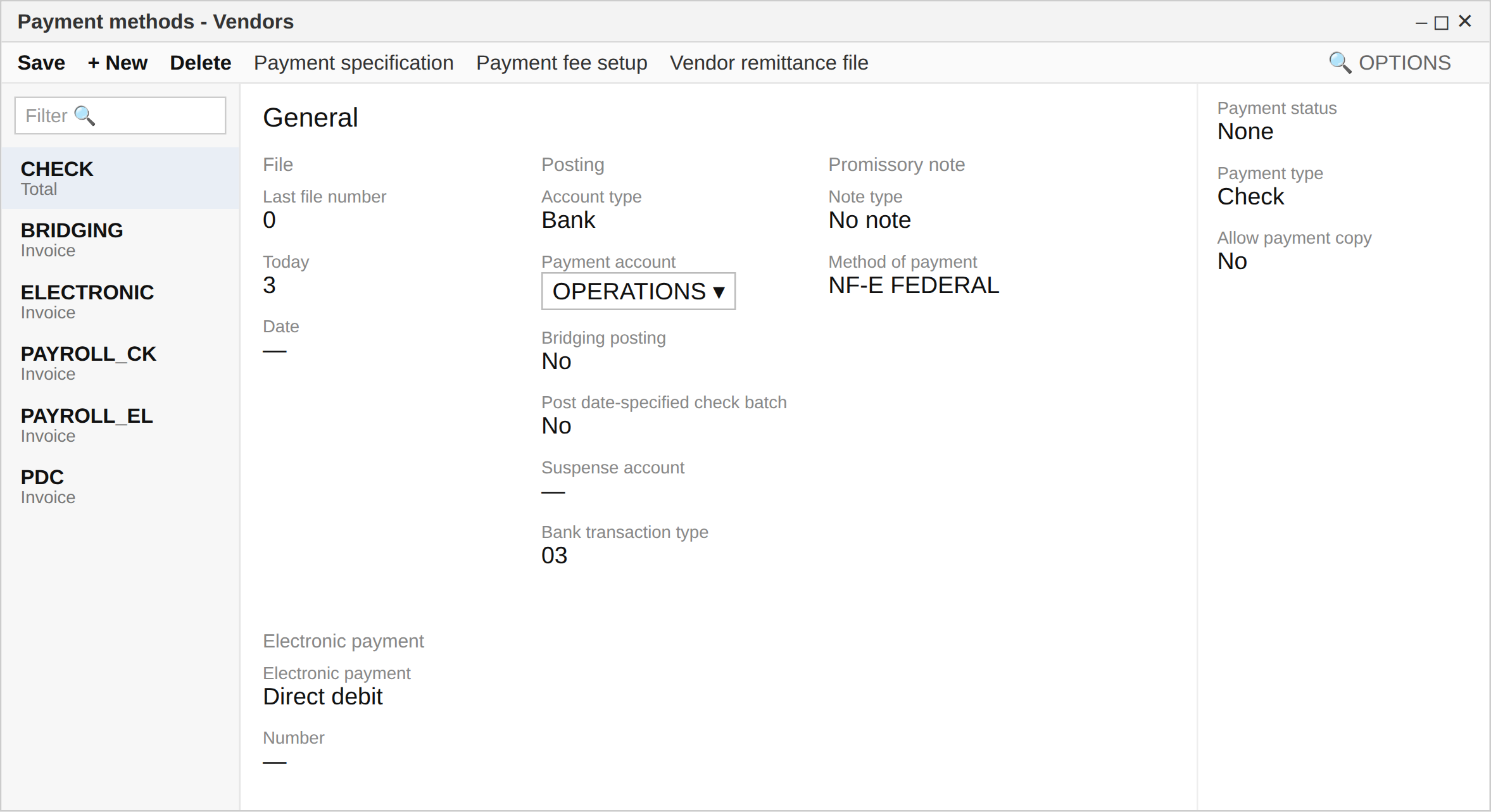
Q3.This is a hotspot question.
You have been asked to set up a vendor payment method.
The accounts payable payment method screen is displayed.
Using the drop-down menus, select the appropriate option for each question based on the information shown on the screen.
Show answer
In the displayed accounts payable payment method, Period is set to Total.
Because this setting pays the selected invoices together, the three invoices to the same recipient are processed as a single payment, generating one check.
In addition, because Grace period is set to 5, 5 days are added to the discount date or due date.
In this question, it is important to read the values of Period and Grace period accurately from the screen.
Create vendor invoices using vendor payments – Finance | Dynamics 365 | Microsoft Learn
Q4.A company handles computer hardware and support services in Microsoft Dynamics 365 Finance.
A customer purchases the following three items on a single sales order.
A laptop, two individual tutoring sessions available within one year of purchase, and a one-year warranty.
For each row’s drop-down, select the item that should be considered in the revenue recognition process.
Show answer
Because the laptop’s performance obligation is satisfied at the point the goods are delivered, revenue is normally recognized at invoicing.
The tutoring sessions, on the other hand, are a service provided within one year of purchase, so revenue is recognized at the time the sessions actually occur.
The one-year standard warranty is closer to a product quality guarantee and is not the target of the revenue schedule selected here.
Therefore, the items to be considered are the laptop and the tutoring sessions.
Revenue recognition overview – Finance | Dynamics 365 | Microsoft Learn
Q5.A company uses Dynamics 365 Finance for accounts receivable management.
It plans to offer customers the following cash discounts.
Payment within 7 days receives a 10 percent discount.
Payment within 14 days receives a 5 percent discount.
Payment within 21 days receives a 2 percent discount.
You create the cash discount codes 7D10%, 14D5%, and 21D2%.
You need to assign these cash discounts in the customer account settings.
Select the three actions you should perform.
Show answer
To apply multi-tier cash discounts, you set the first discount code for the customer and chain the subsequent discounts in order using each code’s “next discount code”.
Under these conditions, you first assign 7D10% as the cash discount, then chain from 7D10% to 14D5% and from 14D5% to 21D2%.
Connecting 7D10% directly to 21D2% skips 14D5%, and assigning 21D2% directly to the customer prevents starting from the initial 10% discount.
Therefore, the combination of B, C, and E is correct.
Cash discounts – Finance | Dynamics 365 | Microsoft Learn
Q6.You are creating a budget for the entire organization.
As part of the budget plan, allocations are required to run automatically.
You need to invoke allocation at a specific budget planning stage.
Select the three actions to perform in sequence and arrange them in the correct order.
Drag (or tap) the required number of items from the “Options” on the left to the “Answer area” on the right. You can drag within the answer area to reorder them.
- Set up task approval or a workflow
- Add the budget planning stage allocation automation task at the desired workflow stage
- Create a stage allocation on the budget planning configuration page
- Create an allocation schedule on the budget planning configuration page
- Drag here
Show answer
To run allocations automatically within a budget planning workflow, you first create an allocation schedule to define the allocation method and options.
Next, you create a stage allocation and associate the allocation schedule with the budget planning workflow and the target stage.
Finally, you add the budget planning stage allocation automation task at the desired workflow stage.
This automatically starts the allocation when the corresponding stage is reached.
Budget planning data allocation – Finance | Dynamics 365 | Microsoft Learn
Q7.A company uses Microsoft Dynamics 365 Finance.
You have created a revenue allocation schedule for an item.
You need to link this revenue allocation schedule to the item.
Select the two pages you should use.
Each choice is a complete solution on its own.
Show answer
In revenue recognition, you can set a revenue schedule as a default at the item level.
According to Microsoft Learn, you can define a default revenue schedule on the Revenue recognition FastTab of the Item groups page, and you can also set it for individual items on the Released products page.
The item posting profile is for accounting posting destinations, the charges group is for additional charges, and the revenue allocation journal is for settings related to the resulting journal entries; none of these are used to link a schedule to an item.
Revenue recognition setup – Finance | Dynamics 365 | Microsoft Learn
Q8.A company outsources the manufacturing of its product components to a vendor.
The current journal types are not configured to correspond to vendor invoices.
You need to identify and configure the journal to use for each purpose.
In the answer area, select the journal type to use for each row’s purpose.
Show answer
For journal names, you select the appropriate journal type according to the purpose.
Statistical transaction is used to record statistical information, so it corresponds to calculating internal cost rates by cost center.
Assessment tax is used for the depreciation bonus recovery registration, Payroll disbursement for paying payroll statements, Cash for posting retail transactions, and Budget for setting aside funds for a specific purpose.
Even though vendor-invoice-related candidates are listed, you make your selection based on the content of each row’s Purpose.
Ledger journal types – Finance | Dynamics 365 | Microsoft Learn
Q9.A company uses Dynamics 365 Finance.
You need to configure mandatory budget control.
Set up the required budget control procedure.
What should you do?
Show answer
To achieve mandatory budget control, you specify the target documents and journals in the budget control configuration so that a budget check is performed during transaction processing.
Microsoft Learn explains that on the Documents and journals tab you select the source documents subject to the budget control check.
Importing the budget directly into the general ledger or disabling financial dimensions are not configuration steps.
Therefore, assigning budget control to the source documents is correct.
Budget control overview – Finance | Dynamics 365 | Microsoft Learn
Q10.A client has established multiple legal entities in Dynamics 365 Finance.
All companies and data are stored in Dynamics 365 Finance.
They currently use a separate reporting tool for financial consolidation and elimination processing but want to switch to Dynamics 365 Finance.
You need to configure the system and run eliminations correctly.
As a solution, you set up elimination rules in the system and then run an elimination proposal.
In addition, you configure the rule so that it posts to all companies for which “Use for financial elimination process” is selected in the legal entity settings.
Does this solution meet the goal?
Show answer
In Dynamics 365 Finance, to eliminate intercompany transactions you create elimination rules and can either process them during consolidation or run an elimination proposal in an elimination journal.
To use an elimination rule in an elimination proposal, you activate it and set a journal name of the elimination type.
In addition, the destination company must have Use for financial elimination process selected in its legal entity settings.
Therefore, the presented procedure matches the correct way to run eliminations within Finance and meets the goal.
Financial consolidation and currency translation overview – Finance | Dynamics 365