
Q1.An analytics team operates Azure Data Factory and connects it to a Git repository that has the following three branches.
mam: the collaboration branch
abc: a feature development branch
xyz: a feature development branch
A team member saved pipeline changes in the xyz branch.
You need to publish these changes to the live service.
What should you do first?
Show answer
With Git integration in Azure Data Factory, you must integrate changes into the collaboration branch before publishing to the live environment.
Changes in the feature branch xyz cannot be published directly; you first merge them into the main branch through a pull request so they become the team’s shared state.
After that, running the Publish operation applies them to the live environment.
Therefore the first action to take is to merge into main, and correctly understanding the branching strategy and the publish flow is important.
Source control in Azure Data Factory
Q2.You have an Azure Data Factory instance named ADF1 and two Azure Synapse Analytics workspaces named WS1 and WS2.
ADF1 contains the following pipelines.
P1: Uses a copy activity to copy data from a non-partitioned table in the dedicated SQL pool of WS1 to an Azure Data Lake Storage Gen2 account.
P2: Uses a copy activity to copy data from a text-delimited file in an Azure Data Lake Storage Gen2 account to a non-partitioned table in the dedicated SQL pool of WS2.
You need to configure P1 and P2 to maximize parallelism and performance.
Which dataset settings should you configure for the copy activity of each pipeline?
Show answer
P1 moves data from the dedicated SQL pool of WS1 to Azure Data Lake Storage Gen2.
In this configuration, using PolyBase lets you load large volumes of data in parallel and delivers the highest performance.
P2, on the other hand, handles text-delimited files, so PolyBase cannot be used and you must choose Bulk insert.
Understanding the compatibility between the data format and the load method, and using the copy method appropriately, is what maximizes Synapse performance.
What is Azure Synapse Analytics?
Q3.You operate a C# application that processes data arriving from an Azure IoT hub and performs complex transformations.
You need to replace this application with a real-time solution, and you are required to reuse as much of the existing application code as possible.
Which service should you choose to maximize reuse of the existing code?
Show answer
Because the requirements are real-time processing and reuse of existing C# code, Azure Stream Analytics is the best fit.
In particular, when running on IoT Edge, you can reuse the existing logic as-is through C# user-defined functions (UDFs).
Databricks is mainly for batch processing with Spark, Event Grid is for event notification, and Data Factory is for batch integration, so none of them meet the requirement.
Therefore Stream Analytics, which supports both real-time analytics and C# reuse, is the correct answer.
Azure Stream Analytics on IoT Edge
Q4.You have an Azure Blob storage account that contains one folder.
This folder stores 120,000 files, and each file contains 62 columns.
Every day, 1,500 new files are added to the folder.
For each new file, you plan to incrementally load 5 of the data columns into an Azure Synapse Analytics workspace.
You need to minimize the run time of the incremental load.
What should you use to store the files and format?
Show answer
To efficiently ingest the large number of files added each day, it is important to partition the folder by time (time slices).
This lets you load only the new data and minimizes the scan range.
For the file format, using Apache Parquet, which is columnar and highly compressible, improves I/O and query performance.
Row-oriented CSV or JSON is inefficient because it reads even unnecessary columns.
The combination of time partitioning and Parquet is optimal for minimizing the incremental load time.
Create and use external tables
Q5.You are building a database in a serverless SQL pool in Azure Synapse Analytics.
The data is stored in Parquet files in an Azure Data Lake Storage Gen2 container.
Records are structured like the following sample.
{ “id”: 123, “address_housenumber”: “19c”, “address_line”: “Memory Lane”, “applicant1_name”: “Jane”, “applicant2_name”: “Dev” }
Each record contains up to two applicants.
You need to create a table that has only the address-related fields.
How should you complete the following Transact-SQL?
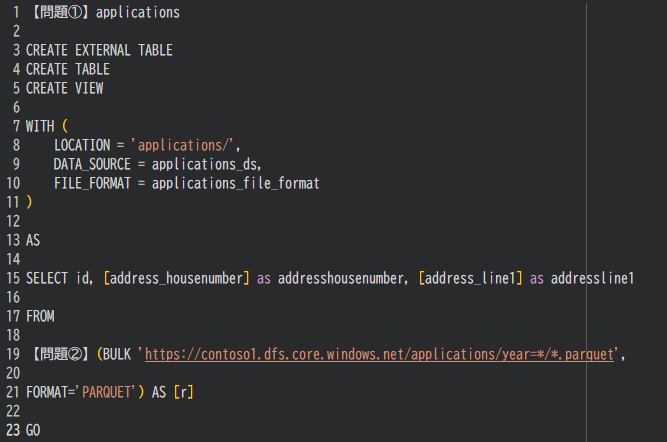
[1] applications WITH ( LOCATION = ‘applications/’, DATA_SOURCE = applications_ds, FILE_FORMAT = applications_file_format ) AS SELECT id, [address_housenumber] AS addresshousenumber, [address_line] AS addressline1 FROM [2] (BULK ‘https://contoso1.dfs.core.windows.net/applications/year=*/*.parquet’, FORMAT=’PARQUET’) AS [r] GO
Show answer
When directly referencing Parquet on Data Lake Storage Gen2 from a serverless SQL pool, you use OPENROWSET to read the external data.
The SQL in this question retrieves only the id and address columns from Parquet, so OPENROWSET goes in [2].
Also, rather than CREATE TABLE, which creates a physical table, it is common to use CREATE VIEW, which exposes only the required columns without moving the data.
Therefore [1] is CREATE VIEW and [2] is OPENROWSET.
Create and use external tables
Q6.You are implementing a batch dataset in Parquet format.
The data files are generated by Azure Data Factory and stored in Azure Data Lake Storage Gen2.
These files are consumed from a serverless SQL pool in Azure Synapse Analytics.
You need to minimize the storage cost of this solution.
What should you do?
Show answer
Because Parquet is a columnar format, a configuration that references only the columns you need is effective for optimizing both storage and query cost.
By limiting the external table to only the necessary columns, you avoid reading unneeded columns and reduce the amount scanned by the serverless SQL pool.
OPENROWSET is merely a way to reference the data and is not a means to lower the storage cost itself.
It is important to choose a design that takes advantage of the columnar format’s characteristics.
Use external tables in Synapse SQL – Azure
Q7.You have an Azure subscription that contains a serverless SQL pool in Azure Synapse Analytics.
You run the following query in the pool.
SELECT * FROM OPENROWSET(BULK ‘https://mydatalake.blob.core.windows.net/data/**’, FORMAT = ‘CSV’) AS datarows;
For each of the following statements, select Yes if the statement is true; otherwise, select No.
| Statement | Yes | No | |
|---|---|---|---|
| This query creates a table named datarows. | |||
| The file https://mydatalake.blob.core.windows.net/data/file1 is read. | |||
| The file https://mydatalake.blob.core.windows.net/data/folder1/file1.csv is read. |
Show answer
datarows is not a table name but an alias given to the OPENROWSET result set, and no table is created.
Therefore the first statement is false.
The /** at the end of the BULK path recursively traverses folders and targets files in subfolders.
file1 directly under data is not read, but data/folder1/file1.csv is read.
It is important to distinguish the meaning of the wildcard specification from that of the alias.
Query folders and multiple files by using a serverless SQL pool
Q8.You are designing the partitioning strategy for a fact table in a dedicated SQL pool in Azure Synapse Analytics.
The table has the following specifications.
It holds sales data for 20,000 products.
It uses hash distribution on a column named ProductID.
It contains a total of 2.4 billion records from 2019 and 2020.
How many partition ranges achieve optimal compression and performance for the clustered columnstore index?
Show answer
In a dedicated SQL pool, data is internally split across 60 distributions, so for optimal columnstore compression, roughly one million rows per partition is the guideline.
From the total of 2.4 billion rows, 2.4 billion / (1 million x 60) = 40.
Creating too many partitions reduces the number of rows per segment and lowers columnstore compression efficiency and query performance.
A design that partitions at the appropriate granularity is important, and the optimal number of ranges is 40.
Best practices for dedicated SQL pools – Azure Synapse Analytics
Q9.You are processing streaming data from vehicles passing through a toll booth.
Using Azure Stream Analytics, you need to obtain the license plate, vehicle make, and pass-through time of the last vehicle that passed in each 10-minute interval.
How should you complete the following query?
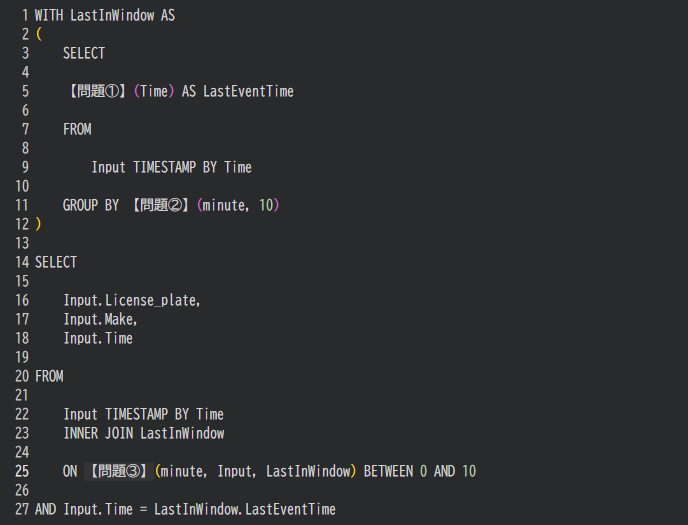
WITH LastInWindow AS ( SELECT [1](Time) AS LastEventTime FROM Input TIMESTAMP BY Time GROUP BY [2](minute, 10) ) SELECT Input.License_plate, Input.Make, Input.Time FROM Input TIMESTAMP BY Time INNER JOIN LastInWindow ON [3](minute, Input, LastInWindow) BETWEEN 0 AND 10 AND Input.Time = LastInWindow.LastEventTime
Show answer
To find the last event in each 10-minute interval, you first need to divide events into 10-minute units.
You use TumblingWindow, which creates fixed-length, non-overlapping time windows ([2]).
Next, to get the latest time within each window, [1] uses MAX(Time).
Furthermore, when joining the original data with the latest time, DATEDIFF is used in [3] to evaluate the difference in time, relating the target events as in DATEDIFF(minute, Input, LastInWindow) BETWEEN 0 AND 10.
Windowing functions in Azure Stream Analytics
Q10.You have an Azure subscription.
You need to deploy an Azure Data Lake Storage Gen2 Premium account.
The solution must meet the following requirements.
Blobs older than 365 days must be deleted.
The administrative workload must be minimized.
Costs must be minimized.
What should you use?
Show answer
To minimize cost, you need to reduce redundancy, and choosing locally redundant storage (LRS) is the lowest cost.
For automatic deletion of blobs older than 365 days, automatically deleting them with an Azure Storage lifecycle management policy is the best approach.
An Automation runbook has high operational overhead, and soft delete is a feature for undoing deletions, so it does not meet the requirement.
Therefore the combination of LRS and lifecycle management is the optimal solution.
Overview of Azure Blob Storage lifecycle management