
Q1.A company operates a Microsoft Entra ID (formerly Azure Active Directory (Azure AD)) tenant named contoso.com.
The company is developing a web service named App1.
You need to enable App1 to read the directory data of contoso.com through Microsoft Graph.
Which three actions should you perform in sequence?
Move the appropriate actions from the list of actions to the answer area and arrange them in the correct order.
Drag (or tap) the required number of items from the “Options” on the left to the “Answer area” on the right. You can drag within the answer area to reorder.
- Create an app registration
- Add group claims
- Add application permissions
- Grant admin consent
- Add delegated permissions
- Drag here
Show answer
Because App1 accesses the directory data of Microsoft Graph as a web service without a user, you configure app-only access.
First, create an app registration, then add the application permissions of Microsoft Graph.
Because app-only permissions have powerful privileges, a tenant administrator finally grants admin consent.
Configuring in this order achieves the read without using delegated access or group claims.
Scenarios for app-only access in the Microsoft identity platform – Microsoft identity platform
Q2.You have an Azure subscription that has a resource group named RG1 and four users: User1, User2, User3, and User4.
You plan to assign the following roles to these users for RG1.
User1 is Reader, User2 is Contributor, User3 is Storage Blob Data Reader, and User4 is Virtual Machine Contributor.
You are considering using attribute-based access control (ABAC).
Which user’s role supports the use of ABAC?
Show answer
Azure attribute-based access control (ABAC) is a mechanism that adds conditions to Azure RBAC role assignments to control access finely based on attributes.
The built-in roles to which conditions can be added are limited, and for Blob Storage, data-plane roles such as Storage Blob Data Reader are eligible.
Reader, Contributor, and Virtual Machine Contributor are general-purpose or VM-management roles and do not support Blob ABAC conditions.
Therefore, User3, who has Storage Blob Data Reader, is the correct answer.
Authorize access to Azure Blob Storage by using Azure role assignment conditions – Azure Storage | Microsoft Learn
Q3.You operate a Microsoft 365 tenant and an Active Directory domain named adatum.com.
You deploy Azure AD Connect with Express settings.
You need to configure self-service password reset (SSPR) to meet the following requirements.
When users reset their password, they must be required to respond to a mobile app notification or answer three predefined security questions.
Regardless of where the reset occurs, the password must be synchronized between the tenant and the domain.
What should you configure for each?
Show answer
The verification methods you allow users in SSPR, such as mobile app notifications and security questions, are configured in the Authentication methods of password reset.
Also, to write a password reset in the cloud back to on-premises Active Directory Domain Services, you enable password writeback in Azure AD Connect.
This synchronizes the password regardless of where the reset occurs.
Note that Azure Active Directory is now the former name of Microsoft Entra ID.
Enable Microsoft Entra self-service password reset – Microsoft Entra ID
Q4.You have a Microsoft Entra tenant that contains the users shown in the following table.
You have a user risk policy with the following settings.
The assignment includes Group1 and excludes Group2.
The sign-in risk targets medium and above.
Access controls allow access but require a password change.
The membership of each user is: User1 in Group1, User2 in Group2, and User3 in Group1 and Group2.
When the users attempt to sign in, the detected risk levels are: User1 High, User2 Medium, and User3 High.
For each of the following statements, select Yes if the statement is true, or No if it is not.
| Name | Membership |
|---|---|
| User1 | Group1 |
| User2 | Group2 |
| User3 | Group1, Group2 |
| User | Risk level |
|---|---|
| User1 | High |
| User2 | Medium |
| User3 | High |
| Statement | Yes | No | |
|---|---|---|---|
| User1 is prompted to change their password when signing in | |||
| User2 is prompted to change their password when signing in | |||
| User3 is prompted to change their password when signing in |
Show answer
This user risk policy includes Group1 and excludes Group2.
User1 belongs only to Group1 and has a high risk, so a password change is required.
User2 is only in Group2 and is not in scope.
Although User3 is included in Group1, they also belong to Group2, so exclusion takes precedence over inclusion and they are not in scope.
Require remediation for risky users – Microsoft Entra ID
Q5.You have a Microsoft Entra ID (formerly Azure AD) tenant that contains an access package named Package1 and a user named User1.
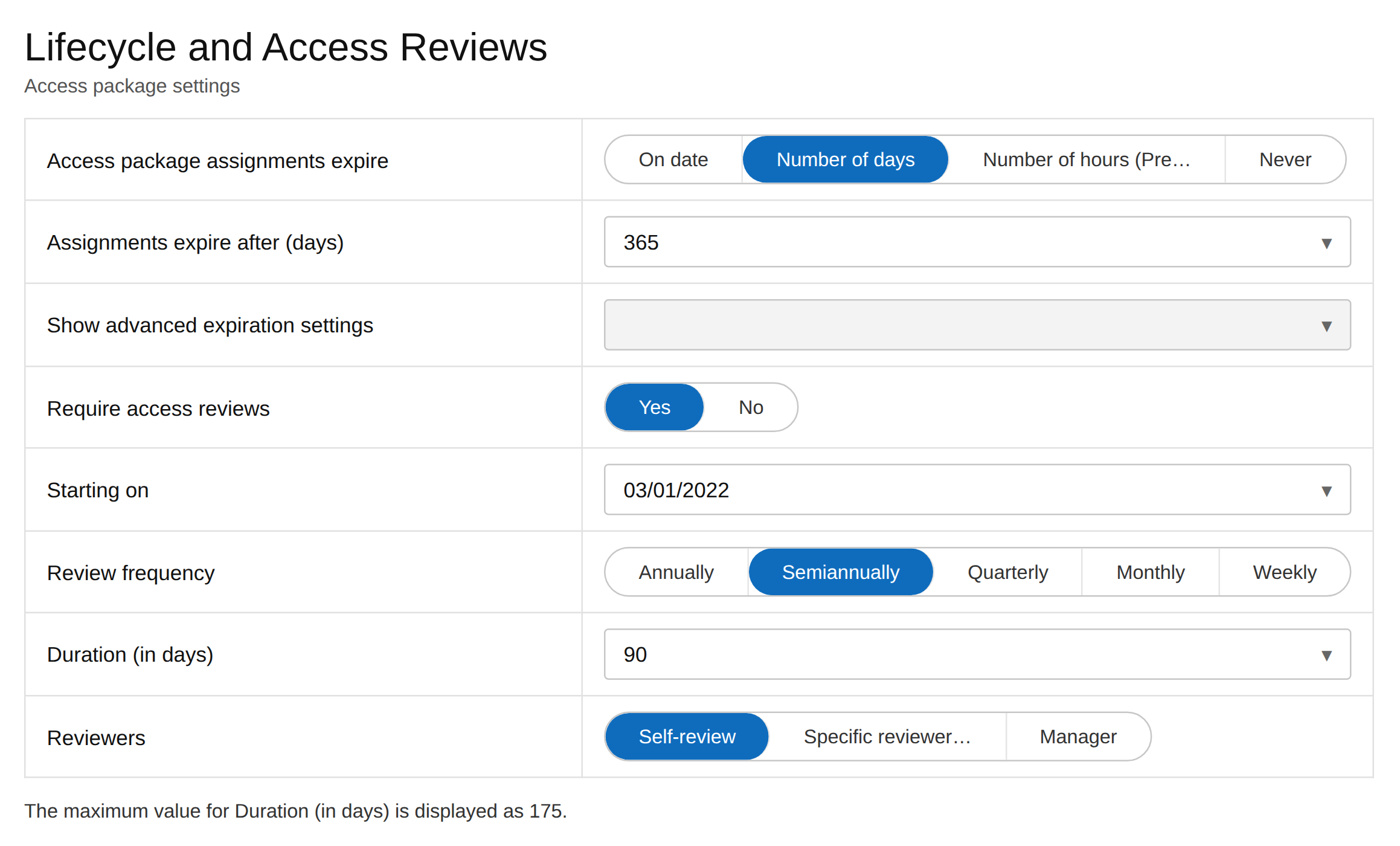
Package1 is configured as shown in the figure.
You need to enable User1 to change the review frequency of Package1.
This configuration must apply the principle of least privilege.
Which role should you assign to User1?
Show answer
Package1 is an entitlement management access package, and changing the review frequency is an operation that manages the access review settings of the access package assignment.
Among the options, the least-privileged role that has the permissions needed for this management is User Administrator.
External Identity Provider Administrator is for federation and Security Administrator is for security features, so they are out of scope.
Privileged Role Administrator is for Microsoft Entra role management and has excessive privilege, so from the perspective of least privilege, User Administrator is the correct answer.
Microsoft Entra built-in roles – Microsoft Entra ID
Q6.You have a Microsoft Entra ID (formerly Azure Active Directory (Azure AD)) tenant that contains the users shown in the following table.
You plan to implement Microsoft Entra ID Protection.
The role of each user is: User1 Conditional Access Administrator, User2 Authentication Administrator, User3 Security Administrator, and User4 Security Operator.
Which user can configure the user risk policy, and which user can view the risky users report?
Select the appropriate options.
| Name | Role |
|---|---|
| User1 | Conditional Access Administrator |
| User2 | Authentication Administrator |
| User3 | Security Administrator |
| User4 | Security Operator |
Show answer
In Microsoft Entra ID Protection, the Security Administrator has full access to ID Protection and can therefore configure the user risk policy.
On the other hand, the Security Operator cannot configure or change policies but can view reports and perform risk response.
The Conditional Access Administrator can create Conditional Access policies that use risk conditions but cannot manage the legacy ID Protection policies.
Therefore, configuration is User3 only, and report viewing is User3 and User4.
What is Microsoft Entra ID Protection – Microsoft Entra ID Protection
Q7.You have a Microsoft Entra ID (formerly Azure Active Directory (Azure AD)) tenant that contains the objects shown in the following table.
The object configuration is: User1 is a user with no license, User2 is a user directly assigned Microsoft Office 365 Enterprise E5, Group1 is a security group assigned E5, Group2 is a Microsoft 365 group, and Group3 is a mail-enabled security group.
Which object can be added as a member to Group3?
| Name | Type | Directly assigned license |
|---|---|---|
| User1 | User | None |
| User2 | User | Microsoft Office 365 Enterprise E5 |
| Group1 | Security group | Microsoft Office 365 Enterprise E5 |
| Group2 | Microsoft 365 group | None |
| Group3 | Mail-enabled security group | None |
Show answer
Group3 is a mail-enabled security group.
Members that can be added to this type of group must be mail-enabled recipients in Exchange.
User2 has a license directly assigned and has a mailbox, so they are eligible.
User1 has no license, Group1 is a regular security group, and Group2 is a Microsoft 365 group that cannot be nested, so only User2 can be added.
Add-DistributionGroupMember (ExchangePowerShell)
Q8.This is a hotspot question.
You have an Azure subscription that contains the key vaults shown in the following table.
KeyVault1 has a retention of 15 days with purge protection enabled, and KeyVault2 has a retention of 10 days with purge protection disabled.
The subscription contains the users in the following table.
Admin1 is Key Vault Administrator, Admin2 is Key Vault Contributor, Admin3 is Key Vault Certificates Officer, and Admin4 is Owner.
On June 1, Admin4 deletes a certificate named Certificate1 from KeyVault1 and a secret named Secret1 from KeyVault2.
For each of the following statements, select Yes if the statement is true, or No if it is not.
Note: Each correct selection is worth one point.
| Name | Resource group | Days to retain deleted key vaults | Purge protection |
|---|---|---|---|
| KeyVault1 | RG1 | 15 | Enabled |
| KeyVault2 | RG1 | 10 | Disabled |
| Name | Role |
|---|---|
| Admin1 | Key Vault Administrator |
| Admin2 | Key Vault Contributor |
| Admin3 | Key Vault Certificates Officer |
| Admin4 | Owner |
| Statement | Yes | No | |
|---|---|---|---|
| Admin1 can recover Secret1 on June 7 | |||
| Admin2 can purge Certificate1 on June 12 | |||
| Admin3 can purge Certificate1 on June 14 |
Show answer
Because KeyVault2 has a retention period of 10 days and purge protection disabled, Secret1 is recoverable as of June 7, six days after deletion.
Admin1 is a Key Vault Administrator and can perform data-plane operations.
Admin2’s Key Vault Contributor is for the management plane and does not have permission to purge certificate data.
Also, because KeyVault1 has purge protection enabled, it cannot be purged during the 15-day retention period, so the purges on June 12 and June 14 are both impossible.
Azure Key Vault recovery overview
Q9.You have an Azure subscription linked to a Microsoft Entra tenant named contoso.com.
This subscription contains a group named Group1 and a virtual machine named VM1.
You need to meet the following requirements.
Enable a system-assigned managed identity on VM1.
Add VM1 to Group1.
How should you complete the blanks in the PowerShell script?
Show answer
To enable a system-assigned managed identity on VM1, you first retrieve the virtual machine object with Get-AzVM and pass it to Update-AzVM to set IdentityType to SystemAssigned.
Because a managed identity is represented as a service principal in Microsoft Entra ID, the target to add to Group1 is retrieved with Get-AzADServicePrincipal using the VM name.
Because Group1 has already been retrieved with Get-AzADGroup, you finally add the ID of the retrieved service principal as a group member.
Update-AzVM is used as a fixed line, not a blank.
Configure managed identities on an Azure virtual machine (VM) – Managed identities for Azure resources
Q10.You have a Microsoft 365 E5 subscription.
You create a new user named User1.
You need to enable User1 to update the status of Identity Secure Score improvement actions.
As a solution, you assign the Exchange Administrator role to User1.
Does this meet the goal?
Show answer
In Microsoft Secure Score, the roles with read/write permission that can edit the status and notes of recommended actions include the Exchange Administrator in addition to Security Administrator and above.
Therefore, assigning Exchange Administrator to User1 enables updating the status of improvement actions.
Thus, this solution meets the goal.
Microsoft Secure Score – Microsoft Defender XDR