Microsoft MB-500 Dynamics 365 Finance and Operations Apps Developer 1-10
表示モード
画像位置
文字位置
理解度の自動記録
STATUS FILTER
Choose confidence levels to display
Loading...
Q1MB-500
Q1.A software vendor is building a new solution for Dynamics 365 Supply Chain Management. The solution is delivered so that each customer can use it in their own implementation environment. Some of the classes included in the solution are designed so that customers can extend them from a separate implementation to meet their unique requirements. For one particular method, you must display a message in the output window during the build process to communicate its intent to other developers. You must implement the appropriate statement for this method. What should you implement?
Show answer
Correct answer: B. An attribute
An X++ attribute is metadata that can be applied to classes and methods, and it can be referenced and processed by the compiler or through reflection. When you want to raise a notification or warning about a specific method at build time and communicate the intent to other developers, declaring it with an attribute is the right approach rather than a comment or the info() function. Because Supply Chain Management development uses the same X++ development foundation as the Finance & Operations apps, you implement the attribute as method-level metadata. X++ attribute classes – Finance & Operations | Dynamics 365
Log in to save your confidence level.
Q2MB-500
Q2.You are responsible for custom development in Dynamics 365 Finance and Operations. An existing model contains a report connected to an in-memory table, a data provider class, a controller class, and a contract class. The report is locked so that it cannot be modified. You must create an extension of the in-memory table within the model and add a new field to that extension. Which three actions should you perform, and in which order? Select the appropriate actions from the list and arrange them in the correct order.
Drag the required number of items from “Options” on the left into the “Answer area” on the right (or tap). You can drag within the answer area to reorder them.
Options
Duplicate the report in the model and add the new field to the duplicated report design.
Create an extension of the existing report controller class in the model and update the class logic to reference the new report.
Duplicate the existing data provider class in the model and update the class to set a value for the newly added field.
Duplicate the existing report controller class in the model and update the class logic to reference the new report.
Create an extension of the existing data provider class in the model and update the class to set a value for the newly added field.
Answer area (execution order, top to bottom)
Drag here
Show answer
Correct answer: Correct order: (1) Duplicate the report in the model and add the new field to the duplicated report design. → (2) Create an extension of the existing report controller class in the model and update the class logic to reference the new report. → (3) Create an extension of the existing data provider class in the model and update the class to set a value for the newly added field.
Do not modify the locked standard report directly; handle it on the extension model side instead. First, duplicate the design of the target report and place the field to be added. Next, extend the report controller class so that at runtime it redirects to the new duplicated report. Finally, extend the data provider class and use an extension point or event handler to set a value for the added field. Using extensions rather than replacing with duplicates is important from an upgrade-resilience standpoint. Expand an Application Suite report data set – Finance & Operations | Dynamics 365
Log in to save your confidence level.
Q3MB-500
Q3.You are developing a form for Dynamics 365 Finance. You need to add a button to the form that lets users run a report. Solution: You create an output menu item. You assign the output menu item you created to the form button and link the report to that output menu item. Does this solution meet the goal?
Show answer
Correct answer: A. Yes
When you want a report to run from a Dynamics 365 Finance form, you associate a menu item with the form button. When the goal is to launch a report, you use an output menu item and specify the target report or report design on that output menu item. Therefore, creating an output menu item, adding it to the form button, and linking it to the report is the correct way to meet the goal. Accordingly, the solution is “Yes.” Application Explorer AOT properties – Finance & Operations | Dynamics 365
Log in to save your confidence level.
Q4MB-500
Q4.You have a cloud-based Dynamics 365 Finance environment configured as follows. The “Development” environment has a Visual Studio workspace configured and is connected to an Azure DevOps branch. The “Build” environment has a build pipeline configured. The “Standard acceptance test” environment is a sandbox used to validate customizations. A developer creates a code extension in the development environment and checks the changes in to the Azure DevOps branch. You must deploy these code changes to the standard acceptance test environment. What should you select for each step?
Name
Comment
Development
A Visual Studio workspace is configured and connected to an Azure DevOps branch.
Build
A build pipeline is configured.
Standard acceptance test
This is a sandbox environment used to test customizations.
How should the deployable package be prepared?
In which section of Lifecycle Services (LCS) should the package be saved?
How should the customization be installed?
Show answer
Correct answer: Build the code in the DevOps pipeline. / Asset library / Select Maintain, and then select Apply updates.
Changes that the developer checked in to the Azure DevOps branch are generated as a deployable package by the build pipeline rather than exported manually from the development environment. The generated package is saved in the Lifecycle Services Asset library. Because the standard acceptance test is a sandbox environment, you apply the package from the environment details by selecting “Maintain” → “Apply updates.” Create a deployable model package – Finance & Operations | Dynamics 365
Log in to save your confidence level.
Q5MB-500
Q5.You are developing a customization for Dynamics 365 Supply Chain Management. You need to optimize the performance of this customization. Which concurrency control option should you implement for each requirement?
Lock a record immediately at the moment it is fetched from the data source
Minimize the resources used when locking a record during an update
Show answer
Correct answer: Pessimistic / Optimistic
Locking a record immediately at the moment it is fetched corresponds to pessimistic concurrency control, which blocks other users’ updates in advance. On the other hand, when you want to avoid holding a lock until just before the update, reducing lock contention and resource consumption, you use optimistic concurrency control. For performance optimization, it is important to understand the characteristics of OCC that avoid unnecessary locks. Select statement – Finance & Operations | Dynamics 365
Log in to save your confidence level.
Q6MB-500
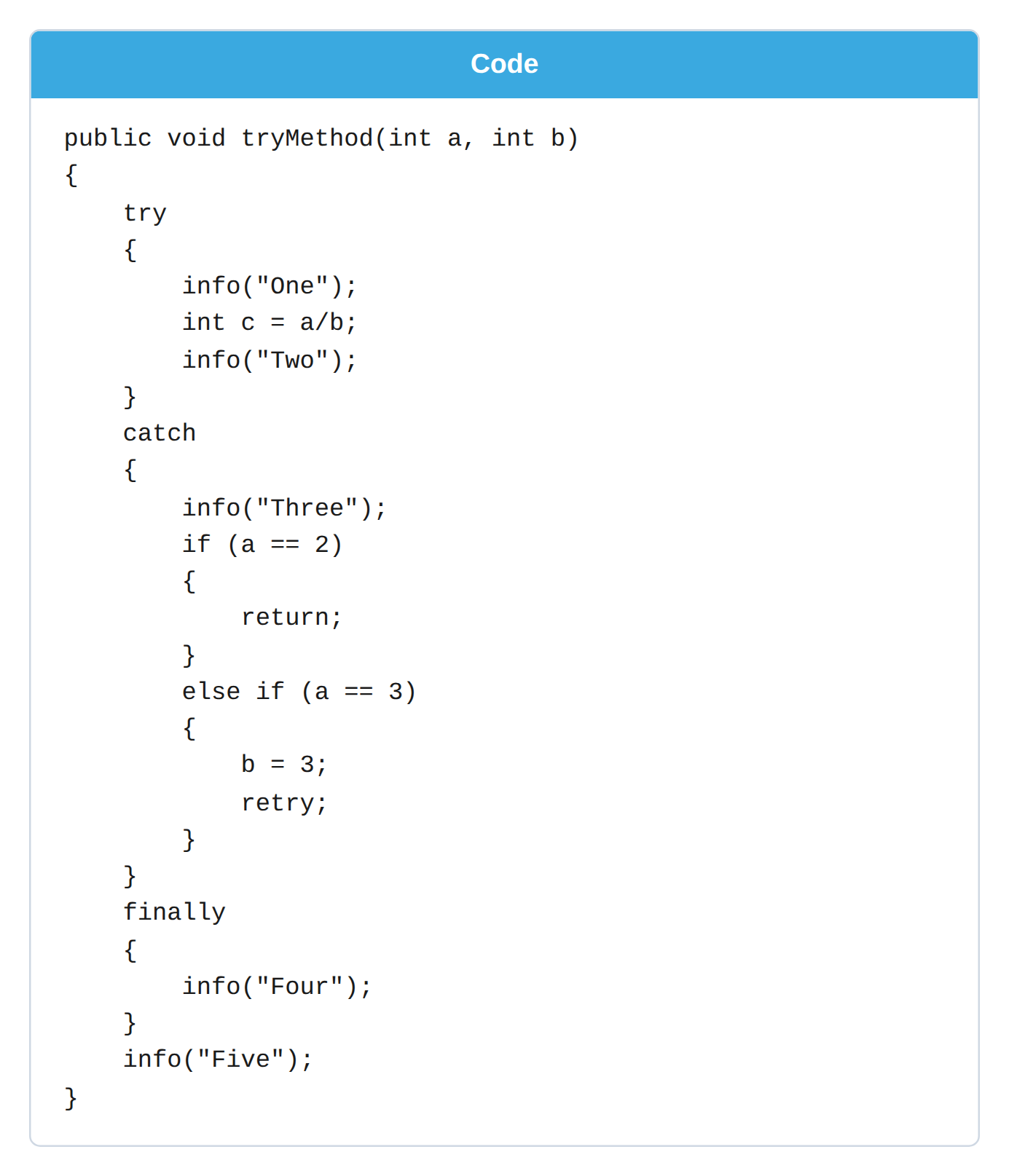
Q6.You are a Dynamics 365 Finance and Operations developer. You have the following X++ code (line numbers are provided for reference only).
public void tryMethod(int a, int b)

{
    try
    {
        info("One");
        int c = a/b;
        info("Two");
    }
    catch
    {
        info("Three");
        if (a == 2)
        {
            return;
        }
        else if (a == 3)
        {
            b = 3;
            retry;
        }
    }
    finally
    {
        info("Four");
    }
    info("Five");
}
You need to evaluate this code. What is the correct output of the method for each call?
tryMethod(5,2);
tryMethod(4,0);
tryMethod(2,0);
tryMethod(3,0);
Show answer
Correct answer: One, Two, Four, Five / One, Three, Four, Five / One, Three, Four / One, Two, Four, Five
When execution completes normally, One and Two inside try are output, followed by Four in finally and then Five. On a division by zero, execution enters catch and outputs Three; even if it returns, finally always runs. When a is 2, catch returns, so Five is not output. When a is 3, b is changed to 3 and retry re-executes the try block; because retry clears the Infolog from the start of try, the final output is the content of the successful re-execution. X++ exception handling – Finance & Operations | Dynamics 365
Log in to save your confidence level.
Q7MB-500
Q7.You are a Dynamics 365 Finance developer. Currently, users can view customers from all customer groups on the customer form. You need to restrict users so that they can view only the customers that belong to a specific customer group. Which four actions should you perform, and in which order?
Drag the required number of items from “Options” on the left into the “Answer area” on the right (or tap). You can drag within the answer area to reorder them.
Options
Build the solution and refresh the browser.
Create a query.
Create a security policy and set the primary table, the query, and the context type parameter.
Add the constrained table to the policy.
Build the solution and run a database synchronization for the project.
Answer area (execution order, top to bottom)
Drag here
Show answer
Correct answer: Correct order: (1) Create a query. → (2) Create a security policy and set the primary table, the query, and the context type parameter. → (3) Add the constrained table to the policy. → (4) Build the solution and run a database synchronization for the project.
To display only a specific customer group, you use extensible data security, which restricts access at the record level. First, create a query that defines the filter conditions, then set the primary table and context on the security policy that uses that query. Next, add the constrained table that limits the target data to the policy, and finally run the build and database synchronization. Extensible data security policies – Finance & Operations | Dynamics 365
Log in to save your confidence level.
Q8MB-500
Q8.You are mentoring a new Dynamics 365 Finance developer. You need to advise them on when to adopt asynchronous integration rather than synchronous integration. In which scenario should you recommend asynchronous integration?
Show answer
Correct answer: B. A company uses an on-premises inventory management system and must receive sales order data once every hour throughout the day.
Asynchronous integration is suited to integrations where the caller can perform subsequent processing in batch without waiting for a response. Option B only needs to receive sales order data once every hour and requires no immediate response or user waiting, so batch-style asynchronous integration is appropriate. Options A, C, and D require “near real time” or “just in time,” so you should consider highly immediate synchronous integration. Asynchronous integration is suited to large volumes of data or processing that can tolerate delay. Asynchronous integration – Training
Log in to save your confidence level.
Q9MB-500
Q9.You are configuring a development environment using Team Explorer. Multiple developers are working on the same customization. You need to ensure that all code is checked in and then merged into the appropriate branch. In which order should you perform the actions? Arrange all of the listed actions in the correct order.
Drag the required number of items from “Options” on the left into the “Answer area” on the right (or tap). You can drag within the answer area to reorder them.
Options
Map the Microsoft Azure DevOps project to the local developer machine.
Create a test branch.
Create a development branch.
Connect to the Microsoft Azure DevOps project.
Create a main branch.
Answer area (execution order, top to bottom)
Drag here
Show answer
Correct answer: Correct order: (1) Connect to the Microsoft Azure DevOps project. → (2) Map the Microsoft Azure DevOps project to the local developer machine. → (3) Create a main branch. → (4) Create a test branch. → (5) Create a development branch.
To start working in Team Explorer, you first connect to the Azure DevOps project, then map the workspace to the local development machine. After that, you create the branch hierarchy. You first create the main branch that serves as the common baseline, then split off a test branch and a development branch in that order. This achieves a branching strategy that lets you promote development code to test and, after validation, merge it into the appropriate branch. Branching overview – Finance & Operations | Dynamics 365
Log in to save your confidence level.
Q10MB-500
Q10.You are developing a customization for Dynamics 365 Finance. This customization must extend objects in the Application Foundation package. To extend them, you must create and configure a new model. Which two actions should you perform? Each option represents part of the solution.
Show answer
Correct answer: A. Create a new model that compiles into its own separate assembly., B. Reference the Application Foundation package when you create the extension model.
In Finance and Operations apps, you extend standard objects from a new model rather than modifying them directly. To extend Application Foundation objects, you create a model in its own package that can be isolated for upgrade and deployment. In addition, that model must reference Application Foundation as a dependency. Adding to an existing package is for legacy scenarios, and specifying the USR layer or creating an extension class alone does not meet the requirements. Models and packages – Finance & Operations | Dynamics 365