
Q1.You are designing an Azure Cosmos DB for NoSQL solution for a company that sells automotive parts.
You plan to provision a new container named Container1 to hold product data for automotive repair parts.
The data structure is shown in the table provided.
You need to recommend how to partition the data for this database.
The recommendation must distribute the workload so that I/O contention is minimized.
Which column should you recommend for the physical partition key and which for the logical partition key?
Select the best options in the answer area.
| Column name | Data type | Data length (bytes) |
|---|---|---|
| Car brand | String | 30 |
| Car model | String | 30 |
| Model year | Integer | 4 |
| Part name | String | 50 |
| Part description | String | 500 |
| Storage location | String | 50 |
| Car brand | Car model | Model year | Part name | Storage location | Part description |
|---|---|---|---|---|---|
| Ford | Escort | 1999 | Door handle | Shelf 5, Bin 3 | Description 1 |
| Ford | Escort | 2000 | Door handle | Shelf 5, Bin 5 | Description 2 |
| Ford | Escort | 2001 | Door handle | Shelf 32, Bin 17 | Description 3 |
| Ford | Escape | 1999 | Door handle | Shelf 43, Bin 12 | Description 4 |
| Chevrolet | Beiser | 1975 | Door handle | Shelf 19, Bin 12 | Description 5 |
| Chevrolet | Bolt | 2024 | Trunk release | Shelf 20, Bin 17 | Description 6 |
Show answer
Model year has five distinct values in the sample data and a higher cardinality than brand or part name, so it distributes writes broadly and suppresses I/O contention and hot partitions.
This makes Model year a good choice for the physical partition key.
Choosing Car model as the logical partition key lets you further subdivide items of the same model year by car model, and the combination of model year and car model is unique in the sample data.
In Azure Cosmos DB, logical partitions are formed by the partition key value, and the service automatically manages their placement onto physical partitions.
Therefore, it is important to choose a key that distributes both data and requests evenly.
Partitioning and horizontal scaling in Azure Cosmos DB
Q2.You have an Azure Cosmos DB for NoSQL database that hosts a container named Container1.
You are developing a new application named App1 that uses Container1.
When App1 attempts to delete a document in Container1, you need to block the operation and return an error to the app.
What should you use?
Show answer
A pre-trigger runs before a database item is modified, so it can throw a JavaScript exception before the delete is processed, abort the operation, and return an error to App1.
A post-trigger runs after the change, and a UDF is used mainly for computations within queries, so neither is suited to this purpose.
Triggers do not run automatically, so App1 must explicitly specify the pre-trigger when it issues the delete request.
Note that the “document” in the question is now referred to mainly as an “item” in current Microsoft official documentation.
How to write stored procedures, triggers, and user-defined functions in Azure Cosmos DB
Q3.You have an Azure Resource Manager (ARM) template that provisions Azure Cosmos DB accounts and databases.
Each account is deployed to a single Azure region.
Each database has provisioned throughput configured.
The region name, the database throughput type, and the throughput value are all defined as template parameters.
You need to modify some of the accounts and databases according to each of the following scenarios.
Scenario 1: Add a read region and increase the database throughput.
Scenario 2: Switch a database’s manually provisioned throughput to autoscale.
This work must minimize administrative effort and the time required to make the changes.
What should you use for each scenario?
Select the best options in the answer area.
Show answer
Adding or removing a region cannot be performed together with other property changes in the same deployment.
Therefore, in Scenario 1 you split adding the read region and increasing the RU/s into two incremental deployments.
Incremental mode does not delete existing resources that are not included in the template.
Migrating from manual throughput to autoscale is a POST operation and is not supported by ARM templates, so Scenario 2 uses Azure PowerShell.
Manage Azure Cosmos DB for NoSQL resources by using Azure Resource Manager templates
Azure Resource Manager deployment modes
Q4.You need to configure an instance of Apache Kafka so that it can ingest data from an Azure Cosmos DB for NoSQL account.
Data from a container named telemetry must be pushed to a Kafka topic named iot.
This configuration must retain the data in a compact binary format.
Select the three configuration items to include in the solution.
Each correct answer presents part of the solution.
Show answer
To send data from Cosmos DB to Kafka, you use the CosmosDBSourceConnector.
A sink connector, conversely, is used when writing data from Kafka into Cosmos DB.
A compact binary format uses AVRO, so the AvroConverter is required.
Also, topicmap takes the form “Kafka topic name#Cosmos DB container name”, so it is set to iot#telemetry.
In a real configuration, you also need to check the value.converter for the data body and the schema registry settings.
Kafka Connect for Azure Cosmos DB
Kafka Connect for Azure Cosmos DB – source connector
Q5.You plan to deploy an Azure Cosmos DB for NoSQL account that stores orders and the order details associated with each order.
You need to recommend an account design that maximizes performance and minimizes cost when reading a single order and its order details.
What should you recommend?
Show answer
When orders and order details are always read together, a denormalized design that embeds the order details as an array within the order’s JSON item is appropriate.
The entire order can be retrieved in a single point read, avoiding queries across multiple items or multiple reads, which reduces latency and RU consumption.
Splitting into separate containers or separate items incurs additional requests or join processing.
Azure Cosmos DB for NoSQL is the current official name, changed from the former SQL API.
Data modeling in Azure Cosmos DB for NoSQL
Optimize request cost in Azure Cosmos DB
Q6.You have an Azure Cosmos DB database.
You plan to create a new container named container1 that stores product data and product category data and mainly handles read requests.
You need to configure the partition key for container1.
The solution must meet the following requirements.
Minimize the size of partitions.
Minimize maintenance work.
Which two characteristics should you prioritize?
Each correct answer presents part of the solution.
Show answer
A high-cardinality key has many distinct values, so it distributes items across many fine-grained logical partitions and helps keep each partition small.
With low cardinality, many items risk being concentrated on the same key value.
A static key does not change its value, so it avoids deleting and re-creating items due to changes and reduces maintenance work.
In Azure Cosmos DB, you cannot change the partition key value of an existing item in place.
Partitioning and horizontal scaling in Azure Cosmos DB
Q7.You have an Azure Cosmos DB for NoSQL account.
You configured a diagnostic setting to send all log information to a Log Analytics workspace.
You need to identify when the provisioned request units per second (RU/s) were changed for resources in this account.
You created the following query.
AzureDiagnostics
| where Category == “ControlPlaneRequests”
What should you add to this query?
Show answer
A throughput change on an Azure Cosmos DB for NoSQL container is recorded as a control plane operation whose OperationName starts with “SqlContainersThroughputUpdate”.
Therefore, adding D extracts the date and time when RU/s were changed.
RegionAddComplete represents adding a region, SqlContainersCreate represents creating a container, and MongoCollectionsThroughputUpdate represents a throughput change on a collection for the API for MongoDB.
AzureDiagnostics is now a legacy-mode common table, and newer configurations can also choose a resource-specific table, but this query uses AzureDiagnostics.
How to audit Azure Cosmos DB control plane operations
Monitor Azure Cosmos DB
Q8.Note: This section contains one or more sets of questions that address the same scenario and problem.
Each question presents a unique solution, and you must determine whether it meets the stated goal.
More than one solution in the set might solve the problem, or none of the solutions might.
Once you answer a question in this section, you cannot go back to it.
As a result, these questions do not appear on the review screen.
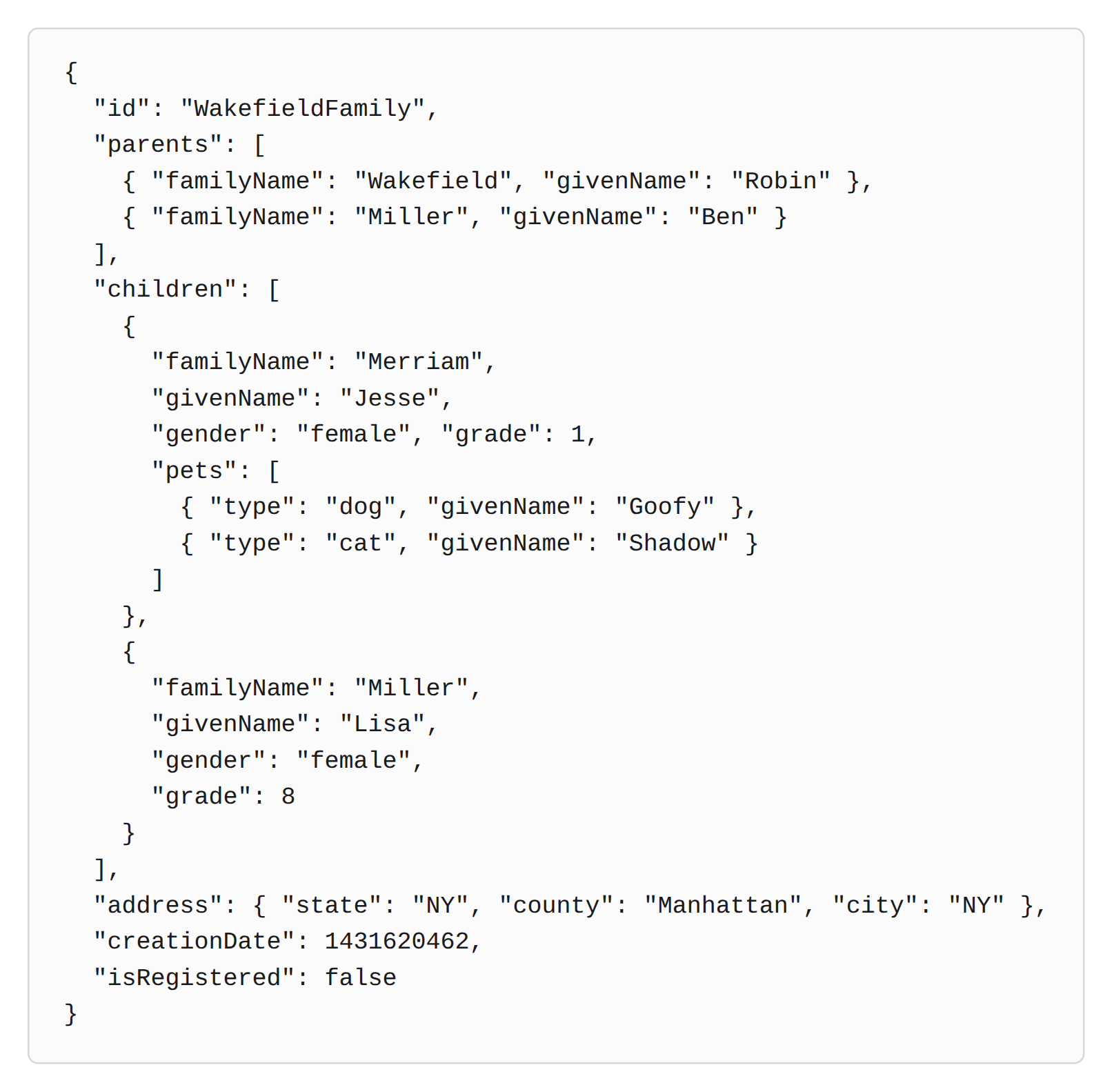
You have an Azure Cosmos DB for NoSQL database that hosts a container named families that stores data in the following format.
Field meanings: parents, familyName is the last name, givenName is the first name, children, gender, female, grade, pets, type, dog, cat, address, state, county, city, creationDate, isRegistered indicates whether registered, and false represents false.
You need to return the following data.
The family ID
The child’s last name
If a pet’s type is cat, that pet’s name
Solution: You run the following query.
SELECT f.id, c.familyName AS FamilyName, p.givenName AS petName FROM families f JOIN f.children c JOIN (SELECT value p FROM c.pets p WHERE p.type = ‘cat’) AS p
Does this solution meet the goal?
Show answer
The first JOIN expands each element of the children array, so c.familyName retrieves the child’s last name.
The subsequent multi-value subquery narrows each child’s pets array to only the elements whose type is cat and returns their givenName as petName.
As a result, it retrieves the requested items of f.id, the child’s last name, and the cat’s name, so it meets the goal.
Current official documentation also supports self-joins within arrays and multi-value subqueries that filter an array before the JOIN.
Subquery – Cosmos DB query language (Azure and Fabric)
Self-join – Cosmos DB query language (Azure and Fabric)
Q9.You have a database named db1 in an Azure Cosmos DB for NoSQL account.
You have a third-party application exposed through a REST API.
You need to migrate data weekly from this application into a container in db1.
Which tool should you use?
Show answer
With the copy activity in Azure Data Factory, you can use the REST connector as the source to retrieve data from a REST API and use the Azure Cosmos DB for NoSQL connector as the sink to write to the container.
Also, a schedule trigger lets you set a recurrence interval, so the pipeline can run automatically every week.
Azure Migrate is used mainly to migrate servers and similar resources to Azure, and the Database Migration Assistant targets assessment and migration of SQL Server-family workloads, so it is not suited to periodic REST integration.
Copy and transform data from and to a REST endpoint by using Azure Data Factory
Copy and transform data in Azure Cosmos DB for NoSQL by using Azure Data Factory
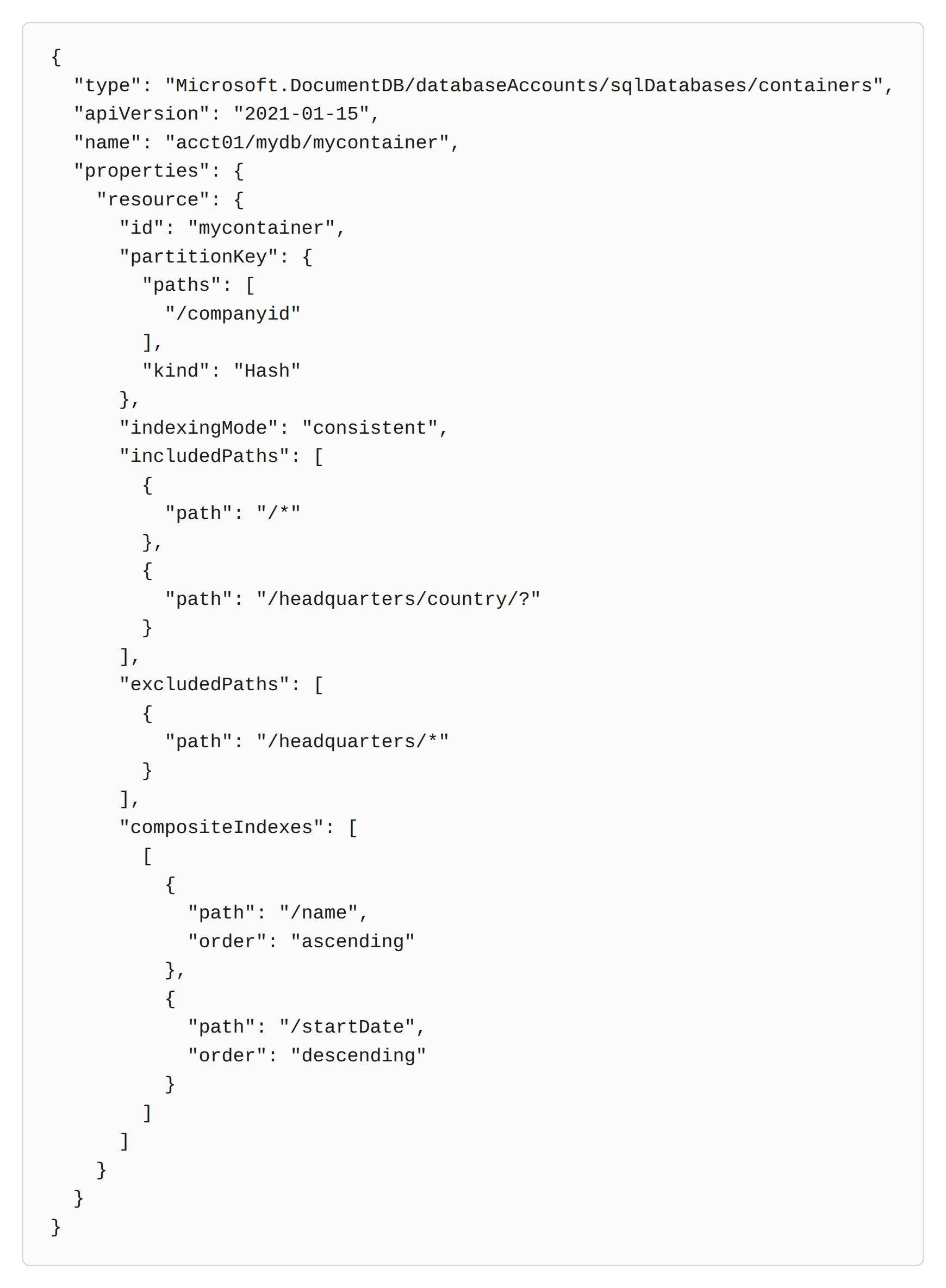
Q10.You have the following Azure Resource Manager (ARM) template.
In the code, consistent represents consistent indexing, ascending represents ascending order, and descending represents descending order.
You plan to deploy this template in incremental mode.
For each of the following statements, select Yes if the statement is true; otherwise, select No.
| Statement | Yes | No | |
|---|---|---|---|
| Deploying the template creates an Azure Cosmos DB account named acct01 if it does not already exist. | |||
| Deploying the template creates a container named mycontainer in mydb if it does not already exist. | |||
| Deploying the template changes the partition key of mycontainer to companyid if mycontainer exists and its partition key is name. |
Show answer
The template defines only the container child resource, so the nonexistent acct01 account and mydb database are not created automatically.
If the parent resources already exist, the incremental deployment creates the not-yet-created mycontainer.
The partition key of an existing container cannot be changed directly from /name to /companyid; using a different partition key requires migrating data to a new container.
Microsoft.DocumentDB is still the official resource provider namespace used by Azure Cosmos DB.
Microsoft.DocumentDB databaseAccounts/sqlDatabases/containers
Set name and type for child resources